Showing posts with label iPhone. Show all posts

Thursday, October 19, 2017

Apple Has A Second Chance at the SEx (iPhone that is)

There's an old story that when Apple was getting ready to release the fast version of the Macintosh SE, their naming convention should have resulted in a Macintosh SEx, but they demurred and gave it the tamer name Macintosh SE/30.  I can remember desperately wanting one, one of the most legendarily future proof machines ever to come out of Cupertino.

And now, I'm waiting impatiently for the rumored new iPhone SE with a modern A11 Fusion chip to replace my rapidly slowing iPhone 5S. And what would you call an iPhone SE with the same processor as an iPhone X?


The Legendary SE/30 (via Wikipedia)

Thursday, August 15, 2013

Apple Devices and Chinese Power Outlets

This summer, 2013, I spent June traveling in China with my wife, children and an assortment of Apple devices. This blog item is about power outlets.

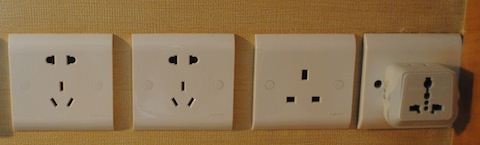
The first thing you might be concerned about is plugging into a wall outlet at the end of the day. For instance, here is what confronted me at a typical Chinese hotel room's desk.

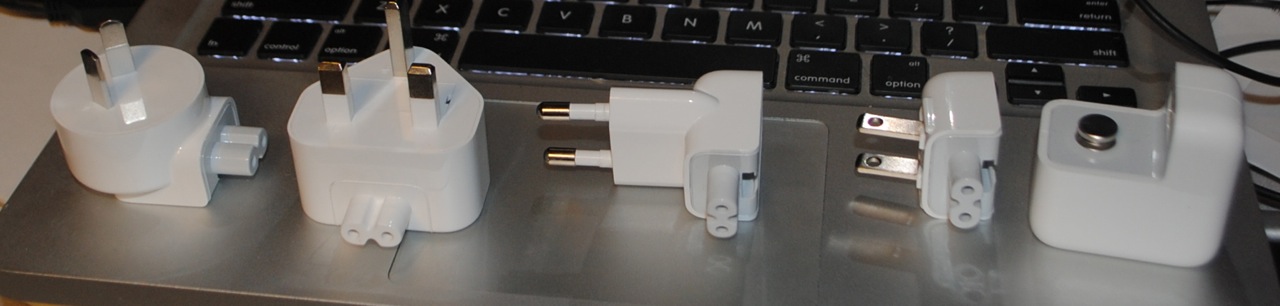
Chinese power is 220V 50Hz AC out the wall, unlike the 120V 60Hz AC I'm used to in the United States. Fortunately, Apple ships its devices with universal power supplies capable of adapting to the voltages of the world. All you have to do is choose the appropriate 'duck head' adapter.
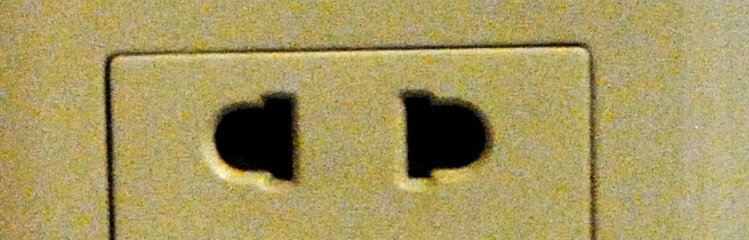
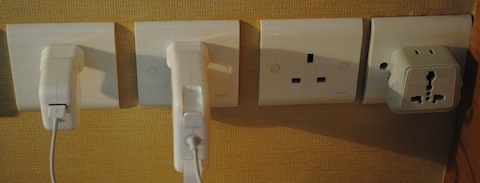
You can just plug an American style duck head into the wall and have it work, it fits OK into this style combination port you see all over the place.
However, I strongly preferred the European duck head due to its stability. The American adaptor had a tendency to pop out, especially the heavy charger for my MacBook Pro. The European head also came in handy as we had a long layover in Zurich and took the opportunity to top off. (By the way, Swiss Air is a well run airline staffed by helpful people.)
So all my Apple equipment charged very well and stayed in place. 
You might ask where one gets different duck heads, well Apple sells a World Travel Adapter Kit although it's on the pricey side for what you get, but it's conveniently in one place. The included power supply is for iPhones, but you can use the duck heads with the power supplies which come with MacBooks, iPhones, iPads, or iPods.

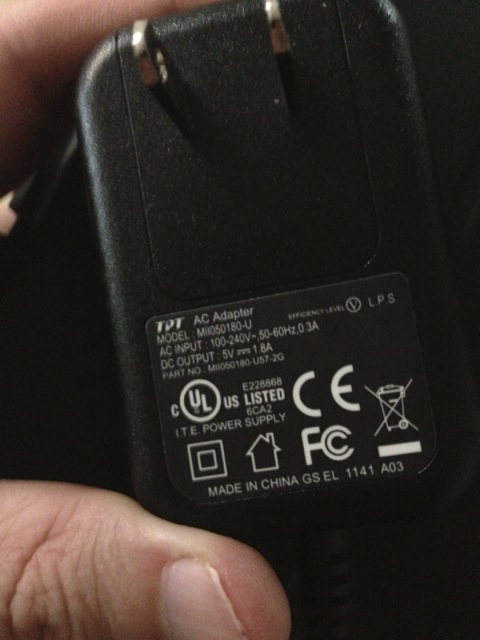
Apple isn't the only company whose products will just work. Here's the power supply for a Kindle Fire which clearly states it will work at between 100 and 240V and between 50 or 60Hz. However, no cool adapters.
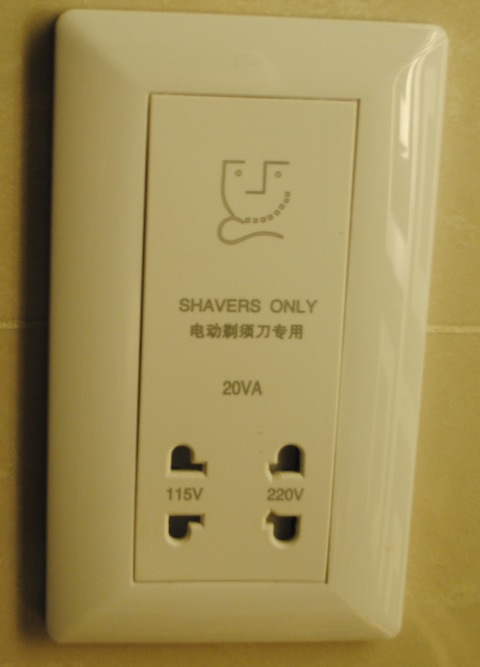
My Oral-B electric toothbrush had no such comforting label on its charger, so I risked putting it into the 'shavers only' 115V outlet found in most hotel bathrooms. It didn't burn up, but presumably running it at 50Hz was not optimal and might harm it in the long run.
So, you may want to purchase a power converter before starting your journey for some non-Apple gadgets. 

I hope you were aided by this blog entry and that you have an enjoyable and educational journey in China. It's a lot to take in.

Monday, October 05, 2009

iPhone as Baby's First Computer

My son, Wil, wanted to paint on my unibody Macbook this evening. He turned four in September and this was the first time he'd wanted to drive Dad's computer. In the past, "we've" painted by him telling me to "draw an alien fighting a dinosaur." So, I setup Pixelmator in full screen mode, started him up with a blue brush, and let him go to town while I watched The Amazing Race next to him on the couch. And he basically figured it out, with occasional hints from me. He figured out how to switch tools without input from me, and was playing with radial gradients with an arbitrary selection mask in no time. I did notice he was drawing everything with his tiny thumb, which allowed him to put his weight behind mouse clicks on the MacBook's zero button trackpad; I think he would master a traditional trackpad, but the MacBook's trackpad allowed him to better transfer skills he learned from his first computer: my iPod Touch.


He's been using the iPhone interface since he was still 2, and I can still remember my astonishment that he'd mastered the drag to unlock maneuver without any help from me. One of many things, he figured out himself. Thankfully, he has yet to pick up typing my password so he has not been buying apps, although he will make daily trips to the app store looking for new games and will ask me to read the user reviews. He watches YouTube videos and my own collection of videos, plays games, paints, and looks through photos, and has been doing so this entire time. His 2 year old sister does the same, except she has no interest yet in all but the simplest children's games.


In the few times they've ventured to touch my MacBook, they expect that something will happen when they touch the screen. Direct manipulation is so obvious and engrained in how they deal with computers. I've worried if I could even teach them to use a mouse, which seems so foreign and backwards as an input device. But after today's session, I'm not worried. Wil can figure things out; the MacBook trackpad is close enough to what he knows. And he enjoyed learning. I could see how happy he was to learn that pressing the command and z keys would undo drawings.


Monday, April 06, 2009

The Kindle iPhone App and the Return of Reading

Here is a picture of good intentions.

It's my little bookshelf of mainly technical books, right next to the big desk in the basement. And I regret to say, I haven't gone through even a few chapters of most of these books. Some of them are just odd choices, what was I thinking buying Linux Device Drivers? But, most are in domains either interesting, or profitable to know and yet they sit unread. The fact of the matter is that books are inconvenient and they require concentration. I'm a busy guy, and what free time I have ends up in some combination of web surfing or watching TV, usually both at once.


But like everyone, I find myself in the odd 10-20 minutes here or there. Lying in bed after the babies finally nodded off, waiting for the dentist, in a meeting starting late, etc. where I could be reading if I had a book at hand all bookmarked and ready to go. And here is where the Kindle App for the iPhone comes into play. It's always available (pockets in my PJs), no worries about lighting, always on the right page. If I activate my iPhone looking for something to do, the icon is right there on the main page. Basically, a low impedance situation to encourage me to read, and I do. I read the inspiring Clean Code cover to cover in the first week, and am halfway through Working Effectively with Legacy Code.


Not that reading a book on the iPhone is perfect. Code listings tend to be littered with confusing hyphens, and are generally hard to read. I'm sure a real Kindle is a better pure reading experience. But the thing is, I am not going to be carrying another device bigger than an iPhone on my person, ever. I'm certainly not keeping it in my pajamas. The iPhone is a good enough reader, and it's there. I could see buying a Kindle for my bedside, and relying on the automatic syncing with my iPhone, but that is way down on my spending list. What is important is that I am reading and getting the personal and professional growth which comes from reading.


Give a person a book and you change their lives.

Monday, March 09, 2009

AppleTV + iPhone Better than Mac for AirTunes

As I described in my last post, I've setup an Airport Express and a ceiling speaker to deliver music to my bathroom. This is cool technology, but after a week of it, it had the feeling of technology which was not going to become part of my daily routine. The major problem being that I had to remember to start the music playing from my MacBook before heading to the shower, and remember to shut it off afterwards. Several times, my wife made a special trip downstairs just to close the lid of my MacBook.


Then I realized this is just the sort of thing the Apple Remote app for iPhone is supposed to make easy, as I can control the music from wherever I might be in the house. And I further realized that I didn't have to leave my MacBook running all the time. The AppleTV in the living room is always on, contains my complete music collection, can be controlled by the Apple Remote app, and it can be told to send music to any AirTunes speakers on the network, including the Airport Express hooked to my bathroom speakers.


This has the major benefit of giving my wife equal control over the speakers as her iPhone can control the music as well as mine, and in a simple form her technological indifference won't mind.


So yeah, this seems right.

Sunday, December 14, 2008

How I Drive Around With My iPhone

If you insert your iPhone's headset into your iPhone, and then plug an iPhone to USB connector into the bottom connector, the phone has a very useful set of behaviors. Regular audio such as music or podcasts will go out the bottom connector—which in my case ends up coming out my car's speakers—while phone conversations will go through the headsets. Also, the click button on the microphone works to pause (single click), answer (single click), hang up (single click) and skip to next track (double click).


Therefore, when I get into the car for my commute home, I plug my headset into the phone, put the right—microphone—ear bud into my ear, and then plug the phone into my car's stereo system. The order this is done is important. Then, as I'm driving around, if someone calls me, I can answer the phone, hang up, and skip tracks all without looking. Be warned, might be illegal in your locality.

Thursday, October 23, 2008

News of the Not News: People Like Free iPhone Apps

This is one of those blog posts where the author has two data points and has to write an entire entry about those points. Here is the data: My iPhone app to help HDHomerun users align their antennas, Signal GH, went 5 days without a sale. This despite getting a favorable mention on a well known podcast on Friday. So I temporarily started giving it away to boost exposure and reviews. A day later, I had 205 downloads from the U.S..

So $2.99 equals 0 unit sales per day == $0.00 profit
And $0.00 equals 205 unit sales per day == $0.00 profit

At least I'm breaking even.

I believe a large number of these downloads are pointless, as you have to have an HDHomerun to do anything at all with Signal GH. There are people who troll the back pages of the utilities section of the App Store, downloading everything free. I just hope these people don't write reviews.

Tuesday, September 23, 2008

How I Didn't Get Rich Via my iPhone App

I think we've all seen the stories about some guy in New Zealand making $6K a day for a Choplifter clone, or another fellow making $250K in two months reimagining Tetris. What you don't hear about are the flops. And I have a flop on my hands. My application to monitor over the air digital television signal quality, Signal GH has sold 10 copies. I had had no illusions that it would be a big seller; the target market is small at the intersection of iPhone owners and HDHomerun users; I just assumed there were a few thousand such people and they would all want my app.


Apparently not.


Unlike a lot of apps getting shoveled onto the App Store, Signal is competently coded; performs a useful service, launches quickly, doesn't leak, doesn't crash, and has only a smattering of bugs. Maybe prospective buyers would like to know this, but I have had no reviews so far.


Part of the problem was that Apple mistakenly lists its release date as the day I submitted it to them for testing, instead of the day they actually released it to the public, so I got no time on the front page of the Utilities page. And part is probably too high a price point, maybe $5 is just too much even for niche market apps. Again, I'm flying in the dark here because I've gotten zero feedback.


I also don't know where HDHomerun users hang out. The forums on Silicon Dust seem fairly low volume. Maybe if the HDHomerun were buggier, people would be filling their forums but dang it if the HDHomerun isn't the most reliable gadget on my network. And, I don't want to make commercial announcements on public forums anyway; nobody likes that sort of thing. I'm not a marketing wiz, I am a fairly good Mac coder.


Oh well, I only wasted a couple weeks of spare coding time. I've learned my lessons about targeting larger markets. I learned a thing or two about iPhone development, and hopefully my next post on the subject will be "How I Did Get Rich Via My iPhone App."

Thursday, August 28, 2008

Signal GH - iPhone App for the HDHomerun

[Update: It's finally in the iTunes App Store.]

I submitted my second iPhone application to the App Store this morning. Signal GH is a utility to monitor the signal quality of over the air television for American and Canadian users of the HDHomerun. I'm charging $4.99 for it, which seems a fair price given what a small market I'm targeting: the intersection of iPhone and OTA HDHomerun users. Anybody who's set a retail price knows how hard it is. And I'm sure there will be a lot of people giving me one star and claiming it should be free, or one star and claiming they didn't understand you needed an HDHomerun. Sorry guys, gotta send my son to day care, the requirements are right in the first sentence of the blurb.


The Silicon Dust engineers did a great job with their libHDHomerun API, anybody wanting to put out a C API should check it out for its use of the language, platform ambivalence, and object like characteristics. Of course, they then released it under LGPL, making me wait the last couple weeks for them to modify the license. But they did, and I promptly submitted.


Now just step back and let the pennies roll in.

Saturday, August 23, 2008

Few USB Car Chargers work with iPhone 3G

[Update: an earlier version of this blog entry said that the 2A Griffin PowerJolt was able to charge my iPhone while playing audio and showing the GPS map. Additional testing showed this not to be the case.]

As I spend 4 hours a week driving my car to and from work, I need my podcasts to keep me sane. Before I bought an iPhone 3G last month, I had a very reliable cigarette lighter to FireWire cable hooked up to a tiny dock which I would plug into my reliable iPod Mini. Apple, to save space, removed Firewire charging on the iPhone 3G thus forcing users to go with the inferior USB style charging. In a quest to replace my previous setup, I found out the hard way how inferior USB charging is.


To replace my original micro dock, I purchased an Apple Component AV Cable. This gave me a USB connector for charging and 2 RCA cables to plug into the convenient RCA ports I had previously installed in my Civic. And to think I was mocked for using RCA instead of a mini jack. Of course, this left me with 3 useless component video connectors, but they were easily bundled up.


Now I needed a cigarette to USB adapter, so off to Amazon. I thought the Mace Group USB Charger looked compact.


And was soon happily zipping back and forth between work and home before discovering something: it wasn't actually charging my battery. In the meantime, I had purchased another copy for my wife's car, and the iPhone did not even recognize that has being connected. So back they went to Amazon.


Needing charger for a long day of taking a visitor around town, I picked up a PowerDuo/PowerJolt by Griffin at Circuit City:


That seemed to go alright for a couple days until I left the iPhone displaying a GPS map for half an hour. What's that smell? The smell of the PowerJolt overheating.


OK, might need something more heavy duty. My, this Black & Decker Power to Go cup holder charger looks the part.

Turns out it only delivers 350mA to the USB port. The iPhone won't even notice you are trying to charge it.


How about this Kensington Car Charger for iPhone and iPod rated at 1 Amp? It says right on the box for iPhone (no mention of 3G)


Well it didn't overheat, but it failed my listening to music with the GPS running test, couldn't quite keep up.


Finally, going back to another Griffin PowerJolt from Best Buy, this one larger and with a 2 Amp fuse.


Here we have a winner. [Correction: During a longer test, the iPhone's battery did not build charge while playing audio and displaying the GPS map, but the PowerJolt kept cool and was nearly able to keep up.] Driving around while listening to music and with the GPS on, it was actually able to top off my battery. And this model has the new, don't start smoldering feature.


It turns out that what any given USB port will deliver in terms of power varies widely: one charger might deliver 5 times as much current as another. I would recommend finding a charger with the highest available maximum amperage, something around 2A like the more recent PowerJolts, and avoiding dual port chargers unless they can guarantee a high current to both ports.

[Update: What is strange about this is that according to System Profiler, my iPhone lives on an allocation of 500mA while connected to my MacBook.]

Thursday, July 24, 2008

Remote Remote for MythTV for iPhone

I've written a "toy app" for OS X Touch, a version of my Remote Remote GH for MythTV application which acts as a remote control over the wireless network to control a MythTV. It's a toy in the sense I am mainly using it to learn the iPhone SDK, and not to earn money, or even a large user base. I don't expect it will find a large following, I was just learning the ways of the iPhone.


Coding for the iPhone is different. Not so much in the GUI classes or the tools, but in the outlook it requires of the engineer. I was working in a resource starved environment; one in which I needed to take care not to run out of memory, not to use network unless needed, and not to spend a lot of time launching or quitting. An environment, where I had to justify every button on the remote control as space worthy. I leaned heavily on Apple's performance tools, much more than I would on a Mac. And, I refactored constantly. Every time I learned something new, I would change my code to work better and better fit the SDK way.


I also needed to use SQLite extensively, and felt compelled to adapt the QuickLite framework to both Objective-C 2.0 and the iPhone. If Tito Ciuro reads this, please send me an e-mail.


And finally, I'm quite proud of most of the artwork:

It's harder than it looks coming up with simple, thematically consistent, iconic graphics. Thanks to my wife for telling me try again after my original app icon design mashed together a picture of a widescreen TV with a remote drawn in perspective. I went with a simple rendering of navigation buttons, which I liked so much I made the buttons part of the actual GUI.