Showing posts with label MacBook. Show all posts

Thursday, August 15, 2013

Apple Devices and Chinese Power Outlets

This summer, 2013, I spent June traveling in China with my wife, children and an assortment of Apple devices. This blog item is about power outlets.

The first thing you might be concerned about is plugging into a wall outlet at the end of the day. For instance, here is what confronted me at a typical Chinese hotel room's desk.
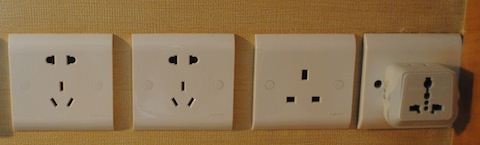
Chinese power is 220V 50Hz AC out the wall, unlike the 120V 60Hz AC I'm used to in the United States. Fortunately, Apple ships its devices with universal power supplies capable of adapting to the voltages of the world. All you have to do is choose the appropriate 'duck head' adapter.
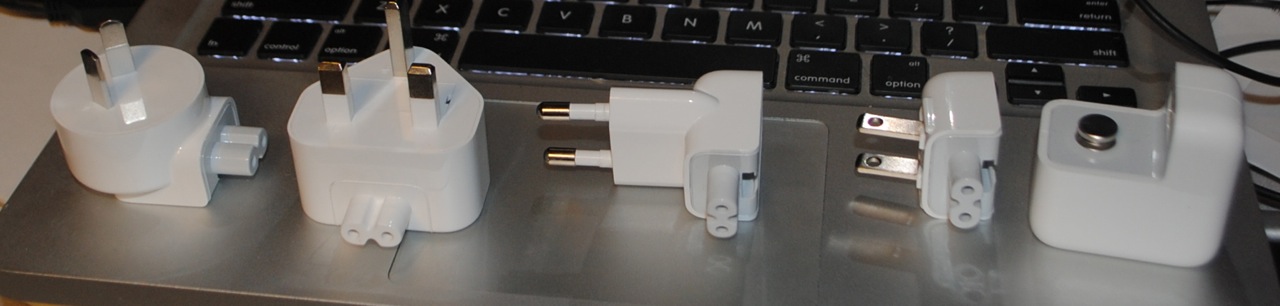
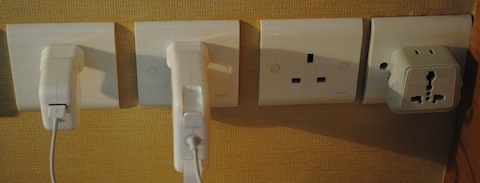
You can just plug an American style duck head into the wall and have it work, it fits OK into this style combination port you see all over the place.

However, I strongly preferred the European duck head due to its stability. The American adaptor had a tendency to pop out, especially the heavy charger for my MacBook Pro. The European head also came in handy as we had a long layover in Zurich and took the opportunity to top off. (By the way, Swiss Air is a well run airline staffed by helpful people.)
So all my Apple equipment charged very well and stayed in place. 
You might ask where one gets different duck heads, well Apple sells a World Travel Adapter Kit although it's on the pricey side for what you get, but it's conveniently in one place. The included power supply is for iPhones, but you can use the duck heads with the power supplies which come with MacBooks, iPhones, iPads, or iPods.

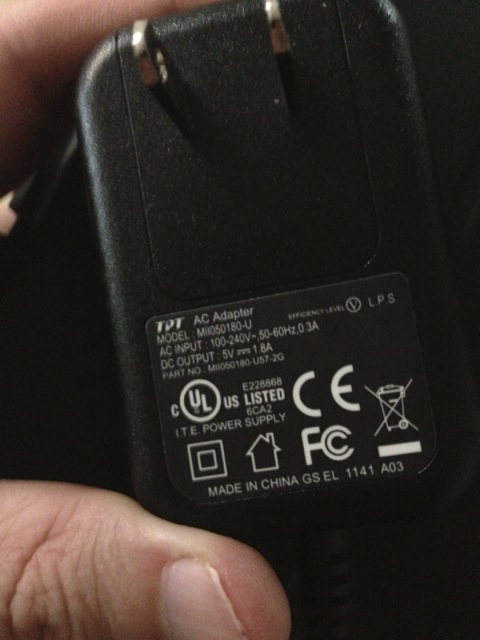
Apple isn't the only company whose products will just work. Here's the power supply for a Kindle Fire which clearly states it will work at between 100 and 240V and between 50 or 60Hz. However, no cool adapters.
My Oral-B electric toothbrush had no such comforting label on its charger, so I risked putting it into the 'shavers only' 115V outlet found in most hotel bathrooms. It didn't burn up, but presumably running it at 50Hz was not optimal and might harm it in the long run.
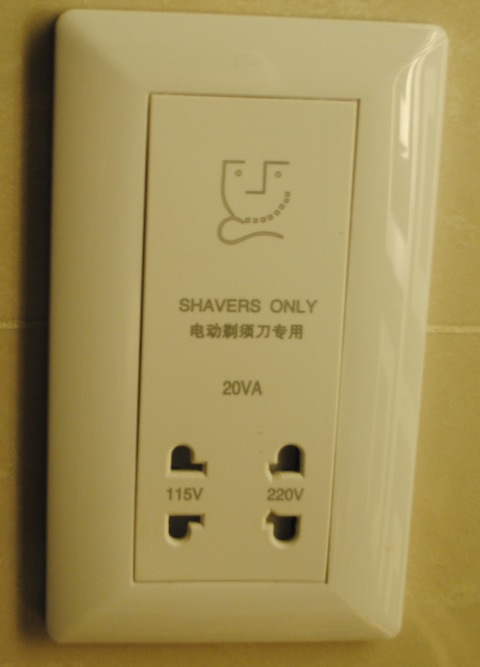
So, you may want to purchase a power converter before starting your journey for some non-Apple gadgets. 

I hope you were aided by this blog entry and that you have an enjoyable and educational journey in China. It's a lot to take in.

Wednesday, November 18, 2009

My Unibody MacBook had Been Grinding to a Halt

I'm used to my Macs being reliable; of going months between forced restarts. And yet, two weeks ago, I found myself restarting my unibody MacBook a couple times an hour. Apps would just lock up with the spinning disk cursor, and I'd go to another app and it would soon lock up to. I associated this with something fairly disk intensive, like doing a Spotlight search, and I found that if I avoided Spotlight things would be OK most days. I tried rebuilding the Spotlight database, reinstalling 10.6.0, upgrading to 10.6.2, etc., with no help.

Finally, under the working theory something was wrong with my 500 GB Western Digital Scorpio Blue drive, I ordered and installed a new 640 GB Western Digital Scorpio Blue drive. And this worked. I don't know if it was the hardware or the completely clean install or the act of reinserting the drive, but it worked and my Mac is back to its normal reliable self. And I've got more disk space than I know what to do with. I learned my lesson a few years back about waiting for a hard drive to fail; I no longer give them a second chance at catastrophe.

This might be the last mechanical hard drive I ever buy for a laptop. SSD capacities are overtaking mechanical, and I would certainly pay $300 for a 512 GB SSD of reasonable read and write throughput. Maybe this time next year.

Sunday, May 27, 2007

My Experience At the Cambridge Galleria Apple Store

I took my MacBook to the Genius Bar at the Cambridge (Mass.) Galleria Apple Store--making sure to make a reservation. The MacBook had been spontaneously shutting down, not sleeping, in low battery conditions, and I wanted to see if the Genius would authorize a warranty replacement of the battery. There was some urgency as my battery cycle count (as shown in the Power section of the System Profiler) was at 288, and my understanding is they will not replace a battery with a cycle count over 299.


I arrived at the designated time--6:15pm on Friday, and my name was already 4th in the queue over the bar. I explained my situation to the genius, he looked at my battery's stats and agreed it needed replacing. He asked me if I needed anything else and I mentioned the palm rest recall; my palm rests had big brownish smudges and he agreed they should be replaced free of charge. Took the 'Book into the back room and twenty minutes later I had a new battery and a pristine palm rest. Very satisfying.


I've had other times when a Genius wouldn't replace a battery--not his fault, the cycle counts rule--so it was nice to walk in and get satisfaction. Also, I don't know if Apple's made any money off of this MacBook. It was bought at educational pricing, had to have its heatsink replaced, and now the free battery and top cover.