Tuesday, September 17, 2013

Why I Raised My Apple TV Rating from 4 to 5 Stars on Amazon

I take product reviewing seriously, and my Top 500 Reviewer badge on Amazon (#200 as of this morning but steadily getting worse) means more to me than it should. I'm the kind of reviewer who will go back and reevaluate a product over time, often for the worse, but sometimes, gratifyingly for the better. And so, as I revised my review of the third generation Apple TV this morning to include the fact Amazon's Instant Video app now supported Airplay streaming, I came to the realization that the Apple TV was now a 5 star product. It had somewhat snuck up on me due to continual, gradual feature improvements by Apple.

I owned the original, big, hot, Apple TV and that was definitely not a 5 star product. Limited, energy inefficient, a means to watch rented TV shows (remember that) and a few other things. When the 2nd generation came out I gave my original to my brother and my 2nd and 3rd generation Apple TVs have been happily getting updates ever since as they benefit from being an iOS device with all of the work Apple puts into improving and adding features to iOS devices and the iOS ecosystem.

Starting with:

  • Energy efficiency. I have a 30W Intel Atom home theatre PC which overheats and doesn't give as smooth an interface as a 1 W Apple TV.
  • Consistent Interface. Apple TV apps/channels all look about the same. You don't have to learn anything switching from Netflix to YouTube.
  • Connectivity. I love that the Apple TV comes with Gigabit Ethernet in addition to Wi-fi. 
  • TOSLink. Not everyone has a HDMI capable receiver, but if you've got a 5.1 speaker setup Apple has you covered with optical sound if needed.
  • Basic content like Netflix, YouTube, iTunes purchases.
  • Free TV shows, a couple times a week, I go and see what's new in the list of free TV shows. I've ended up buying several shows I like this way, like the series of Mickey Mouse short films.
And then Apple started adding features:

  • Bluetooth Keyboard support. I don't even know where my Apple TV remote is. It's so nice being able to type in searches and passwords from a real keyboard. Any Bluetooth keyboard will do, from a cheap iHome to an actual Apple Bluetooth keyboard.
  • iOS remote App. For when you can't find the keyboard or are too lazy to find it. 
  • Airplay. Here's something I do frequently. I listen to podcasts in the shower on my Airport Express connected shower speaker; I get out of the shower and switch the podcast to the speakers in my basement Apple TV. 
  • Airplay Video: I use mirroring from my MacBook to get content unavailable on the Apple TV itself, such as MPEG2 streams I recorded off my antenna. When OS X Mavericks comes out this will be even better as the Apple TV will come up as 2nd separate non-mirrored monitor.
  • PhotoStream. Yes. My wife takes a picture on her phone and it magically appears on the Apple TV's screen saver.
  • More content: Separate apps for the NBA, trailers, Japanese anime, MLB, Flickr... Plus services I don't have access to without a cable plan like HBO, or things I wouldn't pay for like Hulu. 
  • 3rd party app support. As I said, the support for Amazon Prime videos via Airplay pushed me over the edge from 4 to 5 stars. 
  • 720p and then 1080p video. There isn't a huge difference between the two if your TV has a good scaler, but it blows away the video quality from before Apple started streaming HD. I had to upgrade my Internet connection to use it, but it's been worth it. Compare with the horrible "digital downloads" that you redeem in iTunes from many Blu-rays.


So, it snuck up on me. This little Apple hobby has become a great product.

Thursday, August 15, 2013

Apple Devices and Chinese Power Outlets

This summer, 2013, I spent June traveling in China with my wife, children and an assortment of Apple devices. This blog item is about power outlets.

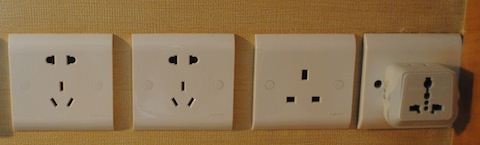
The first thing you might be concerned about is plugging into a wall outlet at the end of the day. For instance, here is what confronted me at a typical Chinese hotel room's desk.

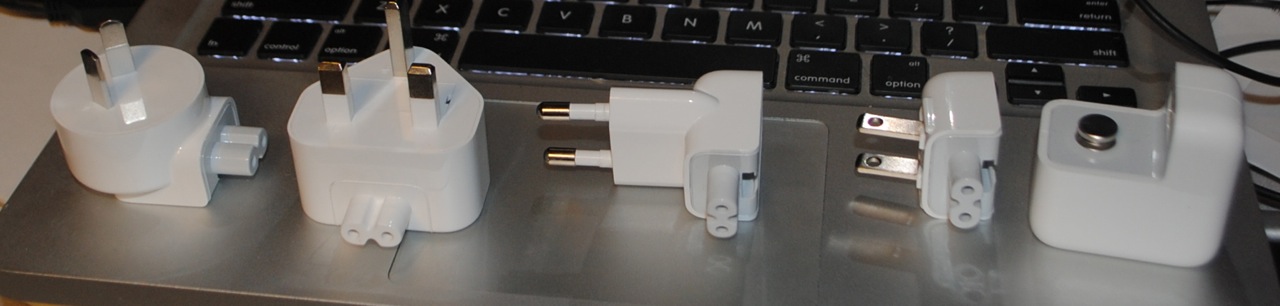
Chinese power is 220V 50Hz AC out the wall, unlike the 120V 60Hz AC I'm used to in the United States. Fortunately, Apple ships its devices with universal power supplies capable of adapting to the voltages of the world. All you have to do is choose the appropriate 'duck head' adapter.
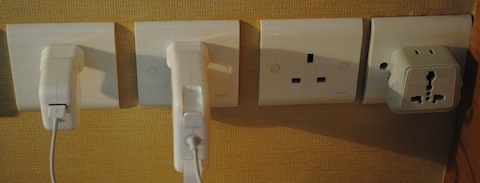
You can just plug an American style duck head into the wall and have it work, it fits OK into this style combination port you see all over the place.
However, I strongly preferred the European duck head due to its stability. The American adaptor had a tendency to pop out, especially the heavy charger for my MacBook Pro. The European head also came in handy as we had a long layover in Zurich and took the opportunity to top off. (By the way, Swiss Air is a well run airline staffed by helpful people.)
So all my Apple equipment charged very well and stayed in place. 
You might ask where one gets different duck heads, well Apple sells a World Travel Adapter Kit although it's on the pricey side for what you get, but it's conveniently in one place. The included power supply is for iPhones, but you can use the duck heads with the power supplies which come with MacBooks, iPhones, iPads, or iPods.

Apple isn't the only company whose products will just work. Here's the power supply for a Kindle Fire which clearly states it will work at between 100 and 240V and between 50 or 60Hz. However, no cool adapters.
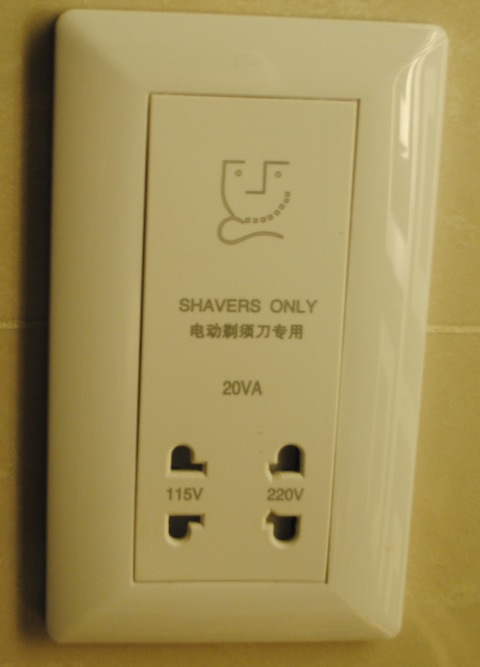
My Oral-B electric toothbrush had no such comforting label on its charger, so I risked putting it into the 'shavers only' 115V outlet found in most hotel bathrooms. It didn't burn up, but presumably running it at 50Hz was not optimal and might harm it in the long run.
So, you may want to purchase a power converter before starting your journey for some non-Apple gadgets. 

I hope you were aided by this blog entry and that you have an enjoyable and educational journey in China. It's a lot to take in.

Monday, August 05, 2013

AppleTV without Remote, Setting up WiFi

I took my AppleTV to visit relatives, but the TV was far from an Ethernet port, and I didn't have the physical remote. So how to setup Wi-Fi? I dragged the TV next to the router so the AppleTV could be plugged into Ethernet, then I discovered you can't setup an AppleTV for WiFi while it's plugged into Ethernet, but if I unplug the from the network my iPhone's remote app can't control the device long enough to enter a WiFi password.
I could have setup a Bluetooth keyboard, but I hadn't brought one either.
I wondered if I could simulate a Bluetooth keyboard with my phone, but apparently you can't do that in iOS so there is no such app. Then I wondered about simulating a keyboard with my Mac, and there is indeed a keyboard simulator available in the Mac App Store: Type2Phone. Reading the setup documentation is required, but in a few minutes I was sending keystrokes to my AppleTV, and I was able to setup my AppleTV for WiFi.

Thursday, May 09, 2013

Building an iOS Framework - Recommendation

I'd just like to recommend this excellent tutorial by Jeff Verkoeyen on creating a framework/resource bundle for distribution of libraries.

Friday, May 03, 2013

How Many Spanish Radio Stations Are There In The United States?

With immigration reform in the news, I was interested while testing my AM Towers USA iPhone app how many AM radio stations serve the Spanish market in Minneapolis. So I took a few minutes to use my apps to generate some images of Spanish format (Spanish, Spanish Talk, Mexican, Latino, Salsa...) radio formats in the USA. FCC data, mixed with formats reported on Wikipedia indicate there are 289 FM stations serving up Spanish market programming in the United States+Puerto Rico.
And 268 AM stations.
These were generated using my AM Towers USA and FM Towers USA apps running in the iPad simulator, but I did tweak the code temporarily to allow so many stations to be displayed at once.

Saturday, March 30, 2013

Extracting Radio Format Information from Wikipedia

I have two radio station apps in the App Store, AM Towers USA which is free, and FM Towers USA which is not. They try to map all the active radio stations in the United States. The information comes from two places, the FCC and Wikipedia.
If my apps are missing a radio station, it's likely because I couldn't find a format for them on Wikipedia. Assuming the station has a Wikipedia page, which the vast majority do, then either the format is missing from the page's radio infobox or it's badly formatted. As a public service, I've reformatted dozens of these boxes like this one for a small station in Arkansas.
{{Infobox radio station
| name                 = KDQN
| image                = 
| city                 = [[De Queen, Arkansas|De Queen]], [[Arkansas]]
| area                 = 
| slogan               =
| branding             = 
| frequency            = 1390 [[kHz]]
| repeater             = 
| airdate              = 
| language             = Spanish
| power                = 500 [[watt]]s day
| class                = D
| facility_id          = 30600
| coordinates          = {{coord|34|1|57|N|94|19|43|W|region:US-AR_type:landmark|display=inline,title}}
| callsign_meaning     = 
| former_callsigns     = 
| owner                = Jay W. Bunyard & Anne W. Bunyard
| licensee             = 
| sister_stations      = 
| webcast              = 
| website              = 
| affiliations         = 
}}

It's missing a format field, so AM Towers didn't pick it up, but the text of the article says it broadcasts a Spanish Music format. Now, I don't know what specific kind of Spanish music this station broadcasts, so I can't in good faith edit this entry, but let's assume it's Spanish Contemporary. I'd insert a field, like so:
| format = [[Spanish Contemporary]]
The [[ ]] brackets are important as they will cause a link to be shown to the Wikipedia page on that radio format, or in this case to the page on the various regional styles of Mexican music.
But what if the station broadcasts in another format, like Spanish Oldies, well then I'd insert:
| format = [[Spanish Contemporary]]/[[Spanish Oldies]]

There isn't any consistency as to what people use to separate a list of formats. Some use semicolons, others slashes, or spaces or HTML breaks. I wish they were consistent, it'd make my job easier.
Then I make sure that all the [ are balanced by ], and that all the { are balanced by }. A stray } can ruin an otherwise parseable infobox.

Thursday, March 14, 2013

Objective-C Categories and Keeping Functionality Separate

Ever since spending months on a never finished project to tear the rendering code out of a large commercial application and into a QuickLook plugin, I've been hypersensitive to dependencies in my code. All of my code is on a need to know basis from the other objects in the project. There are a variety of techniques in Objective-C to aid you in decoupling your code, but the one I'm writing about today is the category.

Let's say I'm writing a document framework, something I'll be using in many apps, each with different needs. Some apps will need editing, most apps will need importing from documents, some will need writing to documents, most will need onscreen rendering, some will need conversion to export formats.

Naively, I could just add all that needed functionality into each of my class's source files. But the Objective-C category allows me to segregate my code by functional topic.

@interface DocumentNode : NSObject
@property(strong, nonatomic, readonly) NSString* type;
@property(strong, nonatomic, readonly) NSDictionary* attributes;
@property(strong, nonatomic, readonly) NSArray* children;
@property(strong, nonatomic, retain) NSObject* cache;
@property(strong, nonatomic, readonly) NSString* name; // an attribute

-(id) initWithAttributes:(NSDictionary*)startAttributes 
           children:(NSArray*)startChildren 
           type:(NSString*)startType 
           name:(NSString*)aName;
@end

and then if I need to have a method to edit the node because I'm writing an editor and not just a viewer, I can create a separate file with an 'Editing' category:
@interface DocumentNode(Editing)
-(DocumentNode*) cloneWithAttributes:(NSDictionary*)newAttributes;
-(DocumentNode*) cloneWithNewChildren:(NSArray*)newChildren;
@end

or if I need a place for my rendering code
@interface DocumentNode(Rendering)
-(BOOL) renderIntoContext:(CGContextRef)quartzContext  
           withDocumentVisitContext:(DocumentVisitContext*)visitContext;
@end

Now, categories are limited in that you cannot add new member variables to your classes via categories like you could by subclassing your objects. You could use objc_setAssociatedObject to implement the storage for a property, but that would probably be too over the top for just keeping implementation separate. When faced with this design problem, I punted and put the property in the main implementation file, as in the following case where my undo ad redo stacks are unused unless the document needs editing functionality.
@interface GHDocument : NSObject
@property(nonatomic, strong) NSMutableArray* undoStack; // only used if Editing is included
@property(nonatomic, strong) NSMutableArray* redoStack;
In practice, once the code is factored in this way, it can be reused modularly. If I have a project that just acts as a viewer, I just don't include the 'DocumentNode+Editing.h' in my other source files, and I don't compile the 'DocumentNode+Editing.m' file by unchecking it's inclusion in Xcode. For small projects this might not matter much, but when you are building up a large codebase or want to reuse just a small bit in another project, you'll regret not factoring things for modularity from the very beginning.

Friday, February 01, 2013

A Proposed Tweak to The Location Services Arrow

FTC Announces App Guidance

The Verge's description of the guidance is fairly ridiculous, there is no way people would put up with constant notification that their location was being accessed. The OS already does so with the little arrow icon towards the end of the status bar.

Since the government, the FTC, can't think of any productive way to prevent the criminally minded from doing bad things, they want to punish users by giving them a string of mind numbing, experience ruining dialog boxes. Well, if it will satisfy their inner nanny, I propose that Apple add to the variations of the arrow, they already have one for background location services, how about one that developers can set when they get a location and send that location to a server? 

So if I am a weather app, and I need to send my location or a proxy of my location (for instance a region around my location) to a server, I set a property similar to UIApplication's networkActivityIndicatorVisible property, maybe, a geolocationNetworkActivityIndicatorVisible property.  Then the OS can do something like change the arrow icon to something distinct like (2 minutes of Photoshop Elements):
Do I think this is useful? No. All this notify the user stuff does not beat the "doing nothing is a high standard" bar, but it's less obnoxious than a modal alert dialog.


[Update: I guess I should point out that none of my personal apps send geo-location back to my servers, nor do they contain ads, so they don't leak geo data that way either. AM Towers USAFM Towers USATV Towers USA, and Signal GH all make calls to Map Kit, so either Google or Apple at least could know somebody is interested in broad geographical regions, while FM Towers USATV Towers USA, and Signal GH ask the FCC website for contour data when you tap on an antenna pin, so the FCC would know somebody was interested in a given broadcast station, which might be 1000 miles from the phone with the given IP address which made the query. I don't think either of these cases would merit notifying the user, but Apple would have to give guidance should they adopt something similar to my proposal.]

Sunday, January 27, 2013

Wherein I Categorize American Radio Formats

For my AM Towers USA, and FM Towers USA mapping apps, I had to compress well over a hundred radio formats into a handful of categories (it ended up being 11) so here's the raw source:

    NSArray* listOfCategories =
    @[
    @[@"Ethnic Formats", @"Cajun Music", @"Adult Urban Contemporary", @"Black Gospel",@"Classic Hip-hop", @"Contemporary Latino", @"Hawaiian Music", @"Hip Hop", @"Hispanic Rhythmic", @"Hispanic Urban", @"Holy Hip Hop", @"International language", @"Latin American music", @"Latin Pop", @"Latino", @"Mainstream Urban", @"Merengue Music", @"Mexican", @"Native Americans in the United States", @"Polka music", @"Polynesian culture", @"Reggae", @"Reggaeton", @"Salsa Music", @"Soul", @"South Asia", @"Spanish Language", @"Spanish Adult Hits", @"Spanish Contemporary", @"Spanish music", @"Spanish Norteno", @"Spanish Oldies", @"Spanish Religious", @"Spanish Top 40", @"Spanish Variety", @"Tejano", @"Urban Adult Hits", @"Urban Contemporary Gospel", @"Urban Gospel", @"Urban Oldies", @"Vietnamese", @"World Ethnic"],
    
    @[@"News Formats",@"News"@"All News Radio", @"News/Talk", @"Classical Music/News", @"Public Radio", @"Weather", @"Public Broadcasting", @"Sports", @"BBC World Service"],
    
    @[@"Talk Formats", @"Talk", @"News/Talk", @"Christian Talk and Teaching", @"Conservative Talk", @"Hot Talk", @"Progressive Talk", @"Public Affairs Programming", @"Radio Reading Service", @"Sports Talk", @"Talk/Personality", @"Comedy", @"Educational", @"English Language", @"ESPN Radio", @"Home Shopping", @"Non-commercial Educational"],
    
    @[@"High Brow", @"Beautiful Music", @"Classical Music", @"Classical music/News", @"European Classical Music", @"Jazz and Classical", @"Jazz"],
    
    @[@"Country Formats",@"Country"@"Classic Country", @"Classic Country Music", @"Contemporary Country", @"Progressive Country", @"Current Country",@"Hot Country", @"Real Country", @"Mainstream Country", @"Modern Country", @"New Country", @"Texas Country", @"Today‘s Best Country"],
    
    @[@"Religious Music Formats", @"Religious Music", @"Black Gospel", @"Bluegrass and Southern Gospel", @"Christian Adult Contemporary", @"Christian Alternative Rock", @"Christian Contemporary", @"Christian Music", @"Christian Rock", @"Contemporary Christian Music", @"Contemporary Inspirational", @"Gospel Music", @"Holy Hip Hop", @"Inspirational music", @"Southern Gospel", @"Urban Contemporary Gospel", @"Urban Gospel", @"Worship music"],
    
    @[@"Classic American", @"Americana", @"Big Band", @"Bluegrass", @"Blues", @"Cajun Music", @"80‘s Hits", @"1990s in Music", @"Active Rock", @"Album Oriented Rock", @"Bluegrass and Southern Gospel", @"Children‘s Radio", @"Chillout", @"Christian Rock", @"Christmas Music", @"Classic Hip-hop",@"Classic Hits Oldies", @"Classic Rock", @"College Rock", @"Easy Listening", @"Gospel Music", @"Indie Rock", @"Jazz", @"Lite Rock", @"Mainstream Rock", @"Modern Rock", @"Smooth Jazz", @"Pop", @"Punk Rock", @"R&B", @"Rhythmic Oldies", @"Rock", @"Soft Rock", @"Soul", @"Southern Gospel", @"Southern Rock", @"Top 40", @"Tropical", @"Variety Hits"],
    
    @[@"Contemporary Music Formats",@"Contemporary"@"Adult Album Alternative", @"Adult Alternative", @"Contemporary Hit Radio", @"Contemporary Hit Radio/Pop", @"Adult Contemporary",@"Hot Adult Contemporary", @"Bright Adult Contemporary music", @"Adult Hits", @"Adult Standards", @"Adult Top 40", @"Adult Urban Contemporary", @"Alternative Radio", @"Chillout", @"Christian Adult Contemporary", @"Christian Alternative Rock", @"Christian Contemporary", @"College Progressive", @"Contemporary Christian Music", @"Contemporary Inspirational", @"Contemporary Latino", @"Electronic Music", @"Hip Hop", @"Independent", @"Mainstream Top 40", @"Modern Adult Contemporary", @"Modern Rock", @"Smooth Jazz", @"Pop Contemporary", @"Rhythmic Adult Contemporary", @"Rhythmic Contemporary Hit Radio", @"Rhythmic Contemporary", @"Rhythmic Top 40", @"Smooth Adult Contemporary", @"Soft Adult Contemporary", @"Spanish Adult Hits", @"Spanish Contemporary", @"Top 40, Hot Adult Contemporary", @"Top 40", @"Urban Adult Hits"],
    
    
    @[@"Religious Formats",@"Religious"@"American Family Radio", @"Catholic", @"Christian", @"K-LOVE", @"Christian Talk and Teaching", @"Fundamentalist Christianity", @"Modern Worship", @"Religion", @"Religious Broadcasting", @"Spanish Religious"],
    
    
    @[@"Hard to Categorize", @"Campus Radio", @"Alternative/Free Format/Adult Contemporary", @"Children‘s Radio", @"Christmas Music", @"College", @"College/Oldies/Country/Hip-Hop/Rock and Roll", @"Commercial broadcasting", @"Community Radio", @"Dance music", @"Diversified", @"Eclecticism", @"Educational", @"Freeform", @"High School", @"Home Shopping", @"Indie Radio", @"Mass Appeal", @"Music", @"Non-commercial Educational", @"Non-commercial", @"Student", @"Stunting", @"Urban Adult Contemporary Oldies", @"User-generated Content", @"Variety Hits"],
    @[@"NPR Affiliates", @"NPR", @"National Public Radio", @"NPR news, classical music, jazz"]
    ];

Sunday, January 06, 2013

Using Unicode and Emoji In Your Interface

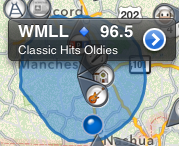
In my newly released iOS app, FM Towers USA—map of most of the FM radio stations in the United States—I had the problem of wanting to customize the popup indicator which appears when you select a pin on the map, but I didn't want to work too hard on it. All the MKAnnotation protocol in MapKit allows is returning strings for the title and subtitle.

I could spend a lot of time adding custom overlays and hit testing to how I deal with Map Kit, or I could just insert a few colorful Emoji characters into my strings.  (Unfortunately, I don't know how to get Blogger to encode the blue diamond character for view even on OS X or iOS.) 

- (NSString *)title
{
NSString* result = result = [NSString stringWithFormat:@"%@ 🔷 %.1f", self.callSign, self.frequency.floatValue];
return result;
}
You might notice that I even made use of the Emoji characters in the images I generated for my map pins. Thus the guitar emoji became the catch-all icon for music like rock, rockabilly, R&B, while the cow represented the various country genres—I wish their was an Emoji cowboy hat. Hey, it's free, quality colorful scalable artwork, I'd rather use it than draw it.

And sometimes, making use of the huge number of characters in standard Unicode can save a lot of time, let's say you need to display chemical formula like H₂SO₄ well,  you might think you'd need a complicated NSAttributedString to insert the subscript codes, but no, all you need is to use the subscripted number characters. Or maybe you want to say 4 1/2, but want to make it pretty, well let me introduce to you the vulgar half character with 4½. I don't know why it's vulgar, it's so beautiful and elegant and has a few cousins ¼ ¾ ⅓ ⅔ ⅕ ⅖ ⅗ ⅘ ⅜ ⅝ ⅞ ⅐ ⅑ ⅒, all of which you can just insert into your source code or localization files.

So, the next time you need an image lain out within a string, look under the Special Characters palette found at the end of Xcode's Edit menu. [Update: I've just realized that iOS 5 has many fewer, and much uglier Emoji style characters, so if you target that platform, please check out the results in the simulator.]

Monday, December 10, 2012

How to Ask for A Feature

A while ago, I complained about a rude request for a feature in How Not to Ask For A Feature. The flip side of this is this recent three star review for TV Towers USA.
Translators?
Not a bad app, very accurate and stable.

If I had one BIG complaint, this does not find TV translators and LP~LD (low power) stations.
 The reviewer was quite right this is a big problem. My only excuse for not adding translators is that I live in New England and translator stations are rare, but in the mountainous West, they are all over the place. So the next versions of TV Towers USA and Signal GH will include translator stations.

 And while I was mucking around in the FCC query pages, I noticed the feature of the FCC website where you can get contour plots in KML for most (some are missing) TV broadcast antennas. So that'll be in the next version too. The app will be greatly improved.

So thanks, Rnb4travel for the constructive criticism.

[Update January 29, 2013: after TV Towers USA 1.2 and 1.3 versions added translators, contour maps and searching, Rnb4travel posted a new 5 star review: “GREAT Improvements! Excellent app” so it all worked out.]

Monday, September 24, 2012

On Vectored Drawing In iOS Interfaces

As someone who spent spent seven years of his life writing a vectored drawing app, I have a deep rooted dislike of the bitmap. Bitmaps are bulky, bitmaps are inflexible. Bitmaps are a general pain. And yet oftentimes, it seems like many iPhone apps are drawn out entirely out of Photoshop.

Take this simple artwork from my iPhone app Signal GH. It formed the background of the graph forming the top portion of the app. I had drawn it in Photoshop Elements in less than 20 minutes.

And formed as in past tense, as I ripped it out this weekend as part of getting the app ready for the new 4 inch displays. Why, let's count the reasons.

  1. In this particular interface, the graph was the flexible element that made use of extra space when available and gave up space when needed. So, I would have needed a separate version for the iPhone 5/new iPod touch.
  2. I had not been handling the shrinking of the interface when a phone call comes in and the big green band comes down. Yet another flexible size needed.
  3. I needed artwork for Retina and non-retina, iPhone and iPad. With the addition of the retina iPhone, that's 5 different variants. 
  4. Should I decide to localize the app, the axis labels "signal quality" and "time" would require new versions per localization so 5n where n is the number of localizations. 
  5. It took up space. Not much but some. I take pride in that of the hundreds of apps on my phone, my apps, TV Towers USA and Signal GH are the second and third smallest behind an old flashlight app. 
So out went the UIImageView backdrop and in came a custom view with 3 subviews for the left axis, bottom axis and the graph itself, all lain out in the custom view's layoutSubviews handler. Here's the code for drawing the left axis:
@implementation LeftAxis
-(void)drawRect:(CGRect)rect
{
    CGFloat axisHeight = GetAxisHeight();
    CGFloat axisWidth = GetAxisWidth();
    CGRect myBounds = self.bounds;
    UIColor* strokeColor = [UIColor colorWithWhite:kGrayLevel alpha:1.0];
    
    CGContextRef context = UIGraphicsGetCurrentContext();
    CGContextSaveGState(context);
    CGContextSetLineJoin(context, kCGLineJoinMiter);
    
    CGFloat myWidth = myBounds.size.width;
CGFloat myHeight = myBounds.size.height;
CGContextMoveToPoint(context,myWidth, myHeight-(axisHeight-axisWidth)); CGContextAddLineToPoint(context, myWidth-kShaftWidth, myHeight-(axisHeight-axisWidth)); CGContextAddLineToPoint(context, myWidth-kShaftWidth, myHeight-axisHeight+kShaftWidth); CGContextAddLineToPoint(context, 0.0, myHeight-axisHeight+kShaftWidth); CGContextAddLineToPoint(context, 0.0, myHeight-axisHeight); CGContextAddLineToPoint(context, myWidth-kShaftWidth, myHeight-axisHeight); CGContextAddLineToPoint(context, myWidth-kShaftWidth, kArrowHeadLength); CGContextAddLineToPoint(context, myWidth-kArrowHeadWidth, kArrowHeadLength); CGContextAddLineToPoint(context, myWidth, 0); CGContextClosePath(context); CGContextSetFillColorWithColor(context, strokeColor.CGColor); CGContextFillPath(context); UIFont* textFont = [UIFont systemFontOfSize:kAxisFontSize]; NSString* signalQualityString = 
NSLocalizedString(@"signal quality", @"signal quality label on left axis");
     CGSize textSize = [signalQualityString sizeWithFont:textFont];
    
    CGPoint drawPoint = CGPointMake(myWidth-kShaftWidth-textSize.height,
                                    kArrowHeadLength+kArrowHeadWidth+textSize.width);

    CGContextTranslateCTM(context, drawPoint.x, drawPoint.y);
    CGContextRotateCTM(context, -1.0*M_PI_2);
    [strokeColor set];
    [signalQualityString drawAtPoint:CGPointZero withFont:textFont];
    CGContextRestoreGState(context);
}
@end

Notice that I draw the entire y-axis, including the protrusion of the x-axis in one continuous path using a single filled polygon. You might be tempted to draw the line segments as individual stroked lines and only fill the arrowhead, but experience tells me that as long as the color is the same throughout, there will be fewer problems if I just fill one contiguous path. For example, you won't get anti-alias artifacts between adjacent elements. Also note that the text is localized and positioned by its measured size and not a magic number. 

The net win here is that I don't have to keep multiple artwork up to date, my app is smaller, I can localize. The operating system can bring down the call bar without distortion, and I'm drawing at the intended resolution of the screen. 

Monday, July 02, 2012

Goodbye to Mobile Me

Well, I just spent an hour moving all the images for this blog from Apple's abandoned Mobile Me hosting to my new genhelp.com domain. Still probably not going to be blogging much going forward.

Monday, May 28, 2012

On Leaving ChemDraw

After nearly 7 years on the job, I've left CambridgeSoft/PerkinElmer. It wasn't done lightly, I'll miss my codebase. I hope Mac users appreciate the near-perfection of their PDFs or how you can call any command from AppleScript or the text clipboard comes out with subscripts intact, or any of a thousand little details I slipped in. All the way while fighting against time as Apple deprecated the technologies it was based upon.

But the job just got less and less of a deal over time: from working home 2 days a week, to having to commute to the office every day, from having flexible hours to having to show up for a scrum meeting every morning. From having stock options+salary to only having salary.

So, I waited for an iOS job to pop up where I live, and grabbed it. It's a fine thing to be a (good) iOS developer. There's always another job to be had.

Tuesday, April 17, 2012

Magenta Apple TV

Just a heads up. Sometimes the auto HDMI setting of the Apple TV (this is the case with both the 2nd and 3rd generation models) doesn't work right. I have a 7 year old Ölevi 720p IPS LCD, which I'm normally quite pleased with picture-wise, but it doesn't like the Apple TV's auto setting, which apparently defaults to YCbCr. Using either the RGB High or RGB Low settings results in a good picture.

Monday, March 19, 2012

new iPad takes 6 hours to charge

I purchased the 32GB model of the Verizon LTE iPad, and while it is a great box (see my review on Amazon), it does have its problems, the most glaring of which is that it takes 6 hours to charge from 0% to 100%.


Obviously, if Apple doubled the capacity of the battery while keeping the USB charging constant at 2.1A/5V, then something had to give and that thing was charging time. Oh, how I miss Firewire.

Thursday, October 13, 2011

iOS 5 Killed (Temporarily) my AT&T Tethering

It came back when AT&T tech support told me to go to Settings : General : Rest and hit the Reset Network Settings button. Which dropped my call to AT&T and caused my phone to sort of reboot, but when it came back up, there was my tethering option in the Settings : General : Network pane.

Sunday, July 31, 2011

Why Some Internet Plugins Stopped Working With Safari 5.1

When I was a junior developer working his first pro job in 1995, we didn't have Safari we had Netscape, and if we wanted to make the browser do something it couldn't do, like play a video or render a PDF, we wrote Netscape plugins against the NPAPI. I wouldn't say we were happy because the API was complex and fragile, but it was what we had. Come forward 16 years, and I'm dealing with NPAPI plugins again. It's only been in the last few years that interested parties have been actively improving to move the API to something that fits in better with a modern OS X browser environment.

Step one was a couple years ago, and involved removing the classic QuickDraw based drawing flavored plugin, replacing it with rendering into a browser provided Quartz context. This also tightened up the rules of when a plugin could draw--in response to a drawing event only--no more drawing while in a mouse tracking loop.

Second step was changing the event model, from one loosely modeled around the pre-Carbon event loop to one loosely modeled around the messages received by a Cocoa view. When Safari dropped support for the old event model between 5.0.1 and 5.1, a bunch of Internet Plugins just stopped loading.

Third step involves the use of Core Animation layers as a drawing environment instead of the Quartz context. Currently an optional drawing mode, the CALayer based model is much more powerful and convenient then the alternative, and I suspect will become the primary flavor of NPAPI plugins on "OS X". They might even allow for the sharing of code between iPhone apps, Mac applications and browser plugins if developers are careful to wrap them carefully—CALayers are the underlying drawing environment of both UIViews (iOS) and NSViews (OS X).

As Safari 5.1 is the default browser on 10.7, and it was recently pushed out to 10.6 users, there are probably a fair number of users searching for updates and tardy developers getting their mouse tracking code finalized. Including me.

Wednesday, June 15, 2011

Neato xv-11 Robot Vacuum

I have never been a regular vacuumer. I have a moderately priced vacuum I bought 20 years ago while in graduate school, and I've probably gone through all of 8 bags. However, I'm a home owner now, with kids, kids who bring in bits of sand, drop crumbs everywhere, methodically chop bits of paper into confetti, and generally make a mess. And a wife who's busy starting her own business. My floors need vacuuming.

I perked up my ears on hearing the new editor of Engadget say his favorite product review of all time was the Neato xv-11 robot vacuum cleaner. I had, of course, heard of the iRobot Roomba—and drive by the iRobot headquarters in Bedford, Massachusetts 5 days a week—but had never heard of the Neato. Reading through the Amazon reviews gave me a picture of a more robust product than the Roomba, with more cleaning per charge and a square face capable of doing corners. So I bought one.

I like it quite a bit, but it cannot operate in the chaotic child-infested environment of my home without supervision. The kids are likely to drop a brush fouling yoyo string or a pile of clothes right in front of its charging station so if I set it to operate on a schedule, I'm likely come home and find it stopped after half a room with something jammed in its brush or it stuck behind a moved space heater. Scheduled cleanings are for people who's houses are always neat.

I've found that the robot and I work best as a team. I'll take it down in the basement, start it going in one end and I'll start picking up in front of it, quickly getting much farther in front of it so that I can clean up the basement in 10 minutes while it takes 45 minutes to vacuum. I'll still have to come rescue it a few times as it will sometimes wedge itself under a piece of furniture or get its drive wheels lifted up, but this takes a few seconds and barely cuts into the labor savings of me vacuuming as thoroughly. It will leave a few things on the floor, it isn't a human that will go back and forth and back and forth over a clingy bit of paper until it finally does get sucked in, but frequent vacuuming quickly leads to pretty floors. I just wish it could climb stairs.

Noise is like a distant jet turbine, not as loud as my old traditional vacuum but enough to distract you from any productive work.

One major problem is that for whatever reason, the Neato does not keep its clock time, like a blinking VCR it can't be relied upon to keep a schedule.

The Neato differs from the Roomba in its approach. The Roomba uses a random walk algorithm to achieve coverage in a room. The Neato finds a path around the circumference of a room and then vacuums it in a grid; I believe this is more efficient and allows it to cover more area on a charge. The Roomba also has beacon lights you are supposed to setup to aid in navigation, the Neato uses an internal laser range finder to map rooms. Whatever it is doing, it almost always knows how to find its way back to where it started, and it has an amazing ability to follow curved surfaces, like the circular base of my recliner.

My wife is most happy with the fact it will clean under beds, picking up years of dust bunnies the first time and keeping it tidy going forward. I'm most happy emptying it's reservoir, seeing all that dust and dirt that was messing up my floors, getting my feet dirty, and potentially getting into my lungs, and sending it along to the landfill.

Saturday, June 04, 2011

Fear, Uncertainty and .Net

[Update: Mary Jo Foley has posted a blog entry saying that her sources are saying that .Net will be available for immersive Windows 8 development. If true, it'd be nice if Microsoft would actually come out and say that.]

Microsoft demoed the tablet application framework for Windows 8 development Thursday. Going forward, traditional apps written in C++, .Net and other legacy technologies will be available to tablet users but utterly painful to use while away from one's keyboard and mouse. You could see a bit of that in the conference video where the presenter fumbles several times trying to snap Excel's document window into place. Old apps are going to be dreaded while in tablet mode. People will need new applications, and combined with the new application store, some developer is going to make a bundle on a touchable version of Notepad.

Flashy new apps were presented written in HTML 5 and Javascript. The interface might look like the Window's Phone 7 Metro UI, but this is not the Silverlight based technology beloved by C# coders. Pure web technologies with no plugins have been embraced by Microsoft, and this is strange and unexpected to me as an observer.

Why is this strange?

One. Microsoft developers are going to go through Denial, Anger, Bargaining, Depression and Acceptance, but mainly anger if this is true. .Net programmers believe they have the best tools, language and framework—as odd as Cocoa programmers might find that belief—they really do. They also tend to have a distain for dynamic languages like Javascript, especially Javascript with it's odd object model, and not quite C syntax. And they've spent the last years mastering the C# language and the massively large .Net frameworks. Any platform company gets its strength from its developer community and this just seems gratuitously hurtful. Finally, they expected to be part of a gold rush to fill both a new Microsoft Windows application store, and custom development orders for the new platform.

Two. It is my impression that Javascript is not an appropriate language for large app design—although I could be convinced otherwise. It's possible that the Javascript part was what was working, and it would be appropriate for lightweight widget like applications like weather apps, twitter feeds, etc. At a later date, Microsoft could add support for other frameworks. This would be the same path as Apple took with the iPhone—web development first followed by native development.

Three. It is conversely and perversely possible that is .Net itself that doesn't scale well in performance at least, and wasn't up to the task of being scaled up from a little phone screen to 30 inch monitors, at least in how Microsoft's OS team would have used it. Presumably, if Microsoft could have released a version of Office built off the .Net framework, they would have. I've had some tangential experience with .Net and complicated renderings, and it hasn't been good, but I'd always assumed things would work out given time to optimize.

Fourth. It is unlike Microsoft, to want their developers to use easily portable technologies. To the extent Windows 8 Javascript and HTML5 isn't littered with calls to Microsoft extensions and framework, will be an indication of a surprising lack of strength on Microsoft's part to convince developers to make unhedged bets on Windows.

As I said perplexing.

And frustrating for anyone seeking to use a base of code across a range of platforms. At one time, a story was building up that you could write a chunk of code in C#, and execute it on the Mac and Linux via Mono, on Java platforms via a code translator, on Android via either Xamarin's .Net framework or a Java translator, on iOS via Xamarin, on Windows Phone 7 via Silverlight, and Windows 8 tablet via either SIlverlight or extensions to .Net. Maybe it wouldn't run well, and wouldn't compete with natively developed apps, but the story was there for project managers to believe. And now that story is sounding iffy.

This might just be a miscommunication. It seems insane for Microsoft to take such an odd route. Maybe when the whole story comes out, JavaScript+HTML5 is just a presentation layer and the bulk of an app will be written in .Net., maybe they just don't have the .Net code ready to demo. But whatever it is, Microsoft owes it to its developers to let them know now, because they can't afford to wait to choose technologies.