Saturday, May 21, 2016

Where are All the New CarPlay Receivers?

Back in late February, I was a bit miffed to hear that the JBL Legend CP100 CarPlay receiver was going to be released while I was visiting relatives in China;  I'd have to order one when I got back. But by the time I got back, it had been delayed until late May. So, I pre-ordered one on Crutchfield and went about wishing for time to pass. Then it was delayed till early July according to the JBL website. Then it was delayed till early August.  I became concerned for my own mortality over wishing for so much time to pass. (Could be worse, I could be waiting for Amazon to start showing Grand Tour episodes, oh wait I am. Curse you time for being both slow and fast in the wrong ways.)

I have now started looking for a different receiver. But few of the 2016 CarPlay receivers announced in January have seen the light of day. Crutchfield has a note like the following on several pre-orderable CarPlay receivers:
Crutchfield first offered this item for pre-order in January of 2016 and we regret that we are still awaiting our first shipment. There have been delays getting the necessary certification from Apple for the CarPlay feature. As soon as we have firm shipping information, we will post an official Estimated Time of Arrival (ETA) for this radio. Thank you for your patience and understanding.
The JVC Arsenal KW-V820BT, and a bunch of Kenwoods are also awaiting pre-order. [Update: in early July, the KW-V820BT shipped].

That leaves Pioneers: the AVIC-8200NEX and its siblings (7200, 6200, 5200), which are all navigation/DVD playing receivers, and the AVH-4200NEX which is a DVD receiver. Since this is slated for the front of my Civic and Apple invented a thing called the iPad, I don't have much use for DVD playback. I have a hard time imagining the use case where I'm stopped, with my parking brake engaged, watching DVDs. My kids tend to watch YouTube videos in the back seat over the cell network while I drive.  CDs? What is this 1999? As for navigation, I like the constantly updated Apple maps, so the advantage of a navigation receiver is for when I'm out of range of a T-Mobile tower. This does happen when I take the kids up into the White Mountains north of where I live in New Hampshire. Also, apparently, the external GPS antenna can supplement the GPS in my phone, making location services more accurate while driving.  At the moment, Amazon has the AVIC-5200NEX for $575, and the AVH-4200NEX for $520. The 4200 has more media options: HD Radio, an SD reader, HDMI input, and more important for a lot of people: Android Auto support. To get everything in one package, you have to move all the way up to the AVIC-7200NEX, which Amazon sells for $822.  I tend to think the only feature I'd ever use is the external GPS antenna, and possibly the maps which might be worth the $55 premium.

It seems like every receiver has 1.0A USB charging. It'd be nice if it had 2A charging for an iPad or to fast charge an iPhone 6 Plus.

I'm not looking at older CarPlay receivers because I'm hopeful the newer models will be zippier and have the earlier generation kinks fixed. The reason I waited so long on the JBL was because their demonstration videos showed it to be quite fast and allow for pinch to zoom on maps instead of pressing zoom in-zoom out buttons.  So, I'm ignoring older models like the Alpine iLX-007 or the Pioneer AppRadio series.

There is the whole resistive versus capacitive screen debate, and given my druthers, I'd prefer capacitive for its responsiveness, but I don't want to pay a premium for it. And I'd prefer a big volume knob and an easy to hit Siri button, but that doesn't appear to be a choice. Therefore, if I were to buy a receiver today based on specs, price, and availability, I'd buy the AVIC-5200NEX. But I'd be really unhappy about paying about $120 extra for a DVD player I literally will never use after reviewing it. 

I wonder why Apple is delaying so many of the other receivers, they don't seem to have appreciably different specs from the Pioneers they approved. It has the same USB amperage and screen resolutions. In the hopes that something they announce at WWDC in a few weeks will make this make sense, I'm going to hold off ordering the AVIC, but it is weird.

[Update: Crutchfield support tells me:
That receiver has become more delayed than we anticipated. You will probably getting a letter from us soon. The receiver now may not be here until January of next year.
]

[Update 2: I bought my wife a Sony XAV-AX100 and have been very happy with it. It's much nicer than the JVC KW-820BT I purchased for my Civic.]

Sunday, May 08, 2016

Note to self, UINavigationController's setToolbarHidden does something different than setNavigationBarHidden

I spent a very long time thinking that I could somehow not put a UINavigationController in a container view (despite having done so before) because I was autocompleting to setToolbarHidden instead of setNavigationBarHidden. A very, very long time. guard let myNavController = self.navigationController else { return } myNavController.setToolbarHidden(true, animated: true) // is different than myNavController.setNavigationBarHidden(true, animated: true)

Friday, April 01, 2016

Mazda Had Best Start Supporting CarPlay

Recently, I've had two passions in my life as a consumer. I've been dreaming of finally moving on from my 2003 Honda Civic, and buying the hatchback version of the Mazda 3. And, I've been eagerly awaiting delivery of a pre-ordered JBL Legend CP100 CarPlay aftermarket stereo for my Civic; a wait that keeps on getting stretched.

The air conditioning might not work, but my old Civic is going to have a nice looking dash (in early June).

You might ask what's keeping me from just buying the lovely and fun to drive 2016 Mazda 3. One, I've been listening to a lot of Dave Ramsey, so I'm intending to do the mature thing and save cash to buy a used one coming off a lease (or a flease as Dave would call it). And two, the current firmware for the infotainment system in Mazdas doesn't support CarPlay. Worse, unlike my Civic, my wife's 2009 Civic, and even the 2012 Mazda 3 my little sister just bought, you can't just pop the factory one out and put in a standard double-DIN receiver along with some cheaply bought custom trim. Crutchfield doesn't list any CarPlay receivers that fit and if there was such a receiver, what would you do with the screen bolted to the top of the dash? Putting CarPlay into a modern Mazda 3 without Mazda's help would take some doing.  

If this situation doesn't change in the next couple years, I'll be happily purchasing the well reviewed 2016 Civic, which does support CarPlay.  

[Update: I noticed in this ride along review (8:22 in) of the new Mazda CX-9, that the Mazda engineer says when asked when CarPlay and Android Auto are coming:
We don't know exactly when yet. Not at launch, unfortunately. As soon as we possibly can. We're working on it. It's really tricky with those guys, they've got their own requirements, our system has its own requirements. You think you've got it lined up—it seems like it should be so simple, and every time we think we've got it so simple they pull another thing out and change something on us.

Wednesday, February 10, 2016

My 2003 Civic Fuel Door Stopped Opening

So, one day, out of the blue, I could not open the little hatch to get gas into my 2003 Honda Civic. Going online, I found this is a fairly common problem wherein part of the cable just rusts out so that the trunk will open (a pull) but the fuel door will not (a push). I also found some guy in Canada who sells a $20 bit of plastic that snaps over the existing cable and makes it work again without ripping out half  your car. Instead you have to rip up only the trim in the driver side door bottom—which is tough enough and I don't want to do that again. Seems to work, I'll edit this post if it fails anytime soon.

Anyway, this seems like exactly the sort of thing that could be a plan you download and make yourself in 5 minutes on a 3D printer. It would certainly save on the first class mail from Canada.

Sunday, August 30, 2015

New Open Source Library for Extracting Schedule Data from Digital TV ATSCgh

I decided to release as open source (MIT license) my collection of Objective-C classes that can parse out the schedule information from ATSC broadcasts. These are just the classes for that narrow purpose and anyone using them will have to make their own TV tuner class to interface with the actual hardware. So, there isn't even an Xcode project included.

If 2 people can actually use this code I will be happily surprised. Regardless, here it is on Github.

Sunday, August 09, 2015

Goodbye to a Colleague

Yesterday, my former coworker Alan Gorman died of cancer at 51.

Alan and I were hired a month apart at the then CambridgeSoft to work on ChemDraw. He was the PC guy, and I was the Mac guy. For 7 years, we'd chat over cube walls or sat back to back. I've been in more meetings and exchanged more Emails and had more, cordial, arguments with Alan than any other human being. 

Given the stress of keeping ChemDraw's old codebase moving thus paying the salaries of 150 CambridgeSoft employees, plus my own ego and snippiness, it is remarkable that we got along. He was an amazingly dogged debugger, and would follow the trail of a bug for days. It was to him that new document features were assigned, so if you are a chemist who makes use of the Stoichiometry Grid, or need to do an R-group analysis, or if you are a biologist composing biopolymers, thank him.

He was better suited for management, and much more organized, than I, so to him fell the horrible task of eking out productivity from our outsource developers. I certainly didn't envy him that but he took the burden with characteristic stoicism and, mostly, contained temper.

Being the Mac programmer, I fancied myself an artist of sorts, but it was Alan who shamed me with his constant flow of lovely vectored templates for BioDraw such as this one displaying the organelles of an animal's cell.

 
While commuting by train, he'd draw these out with ChemDraw's own spline tools, making him the absolute master of using ChemDraw to draw. Who knows into how many PowerPoint presentations Alan's bright and joyous vectors have found themselves. 

If there was anything I learned from Alan, was something he didn't learn while I worked with him. He commuted 3 hours a day with some combination of train, bike, truck or car. He was known to sleep in his cubicle if he missed the last train. Whenever I think of getting one of the many available iOS jobs down in Boston, I remember Alan and say no. 

Being a transplanted Brit, he loved both kinds of football.  The only time he made it to my house was to watch the World Cup when England was playing and he couldn't get it at his home.  He was a Pats fan; I remember telling him the Pats had traded Randy Moss and him looking like those words made no sense in English.

I hadn't talked to him since February of 2014, I was regrettably miffed with him for two, in hindsight, trivial slights and hadn't even known he was fighting for his life this whole time. Alan was a good person, coder and father, and the world is a lesser place without him. 

Wednesday, June 24, 2015

Amazon Vine and The Power to Tax is the Power to Destroy

For many years, I've been a happy member of Amazon Vine, taking frequent deliveries of random consumer items for review and then keeping them. I've reviewed 432 items over the years, and it has been sweet.

But, in today's eMail, came word that Amazon would now be reporting the "Fair Market Value" of my review items to the IRS so I could be taxed for the income. So instead of being free, items would now cost their value multiplied by my marginal tax rate. Since my marginal tax rate is 25%, it would be as if they were offering me a random assortment of stuff, most of which I have no particular need for 75% off. And, I can't sell the stuff, so there is no getting the money back.

Looking through a couple of pages of stuff I reviewed recently, I have to think that few are things I would have purchased for 75% off.


  • 6 Lightning cables (maybe I could have used 2)
  • Mattress. Like this mattress but at the time, I struggled to even justifying it for free, there's no way I would have taken it.
  • Kids bow and arrow set. Maybe.
  • Princess mechanical pencils. We've got plenty of pencils already.
  • Task chair. I didn't really want it when it was free. No way.
  • Skin cream. No.
  • Mango juice. No.
  • USB scanner. No, have too many already.
  • Children's book. Too young for my youngest. No.
  • Decoratable toy. Probably
  • Avenger's movie toy. Cheap looking junk. Nope.
  • Pencil sharpener. Already have some. No.
  • Expensive noise canceling headphones. On the one hand, I have headphones, on the other hand, very nice looking. Maybe.
  • Cheap headset. Nope.
  • Hammer. Probably.
  • Pack of children's scissors. Who needs an entire pack of scissors?
  • Mattress pad. Probably. 
  • Taco shells. Nope.
  • USB wall outlet. Too much trouble. Nope.
  • Air purifier. Already have fans in the house. 
Basically, I won't be able to justify the expense of much more than 1 item in 10 if I have to pay for it. 

And then there are books. Non-children's books take time to read. As an experienced iOS developer, my short term contract rate is around $110/hr. It might take literally thousands of dollars worth of my time to read a book. Even when they were free, I rarely reviewed real books. The fair market value for a book for me is a large negative number. I can't imagine ever reviewing a real book again for Amazon Vine.

I understand that somebody from the outside might see that I get a printer priced at $100 so I've made $100 worth of income. But that printer is worth much less than $100 to me, otherwise I would have gone out and bought one already. As it is, I have a bunch of perfectly good printers in the house waiting to be hauled to the electronics recycling center because they are out of ink. If Amazon were to offer me another free one, I might not take it. Now that the IRS will be charging me $25 for it, there is no way.  Fair market value has no meaning to me when I can't resell the item, and it's a random assortment of stuff that I'm not in the market for in the first place.

[Update: Well this has settled down and the situation is better than the initial reports. "Fair Market Value" ranges from 0% to over 100% of Amazon's price. Unfortunately you don't know it before you agree to the deal. Food, cosmetics and other disposables are generally 0%. And I guess you can now sell your items after 6 months. Sometimes I can't help myself, so yesterday I took in an expensive Android tablet with its 101% Fair Market Value, oops.

I've definitely scaled back my reviewing, and will not take items I perceive as low quality. Thus my average review rating has gone up and is now over 4. In the past, I'd have taken a try for something iffy and would give out my share of 2 and 3 star reviews.]

Saturday, June 13, 2015

Apple Needs to Thin Out The PNGs

Had a pleasant time at WWDC. As is my habit, I spent most of my time in the labs going over every issue I had that had vexed me. One of the highlights were some soon to be released improvements to my SVGgh rendering library to allow live updating in Interface Builder via support for the IB_DESIGNABLE switch. It took effort, but I finally beat my project into shape, got rid of the old fashioned static library, and was magically playing with showing SVGs inside of IB, and playing with my various button themes. Seeing that first image for the first time was sweet. Also got an assist with some long term problems with rotated gradients, and some pointers about text on a path.

But it also reminded me of how obnoxious Apple's reliance on fixed size PNG bitmap assets has become. The iPhone 6+ brought a need for a 3rd image resolutions, and the possibility of responsive design brings a preference for even more. I spent a couple hours slicing together the 30 PNGs I needed for use with a UISegmented control last week. I have better things to do. Apple added support for dropping a PDF into assets last year, but that just automates the process of making a bunch of bitmaps. And bitmaps are bulky, to the point that Apple will be automatically culling unnecessary ones out before installing them on user's devices

I find my own workflow of generating SVG artwork to be much more satisfying. They match up well with the simple, clean themes encouraged since iOS 7. They are less bulky and I typically only need one image per button. I can even use the 'currentColor' property to manipulate pressed and unpressed states from Interface Builder. I can use SVG's 'non-scaling-stroke' vector-effect to keep outline strokes to be 1 pixel wide regardless of scale. And with responsive design, I can use auto-layout to make my view elements whatever size I need without having to worry about scaling issues.

I would not be surprised if Apple were to support either an existing vector format, or perhaps a new one with size hinting in some future version of UIKit. It's past time.

Saturday, May 30, 2015

The 5 Rating Minimum and Releasing to the App Store

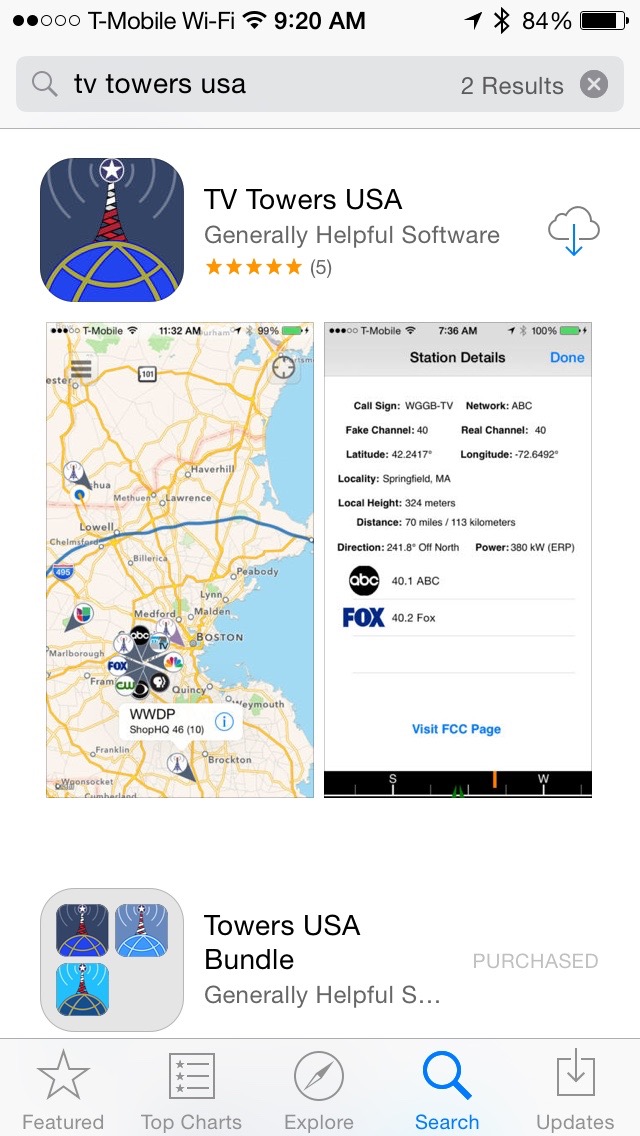
Here is a screen capture of my app TV Towers USA as it looked in the iOS App Store on May 2, 2015:
May 2, 2015 (or so)
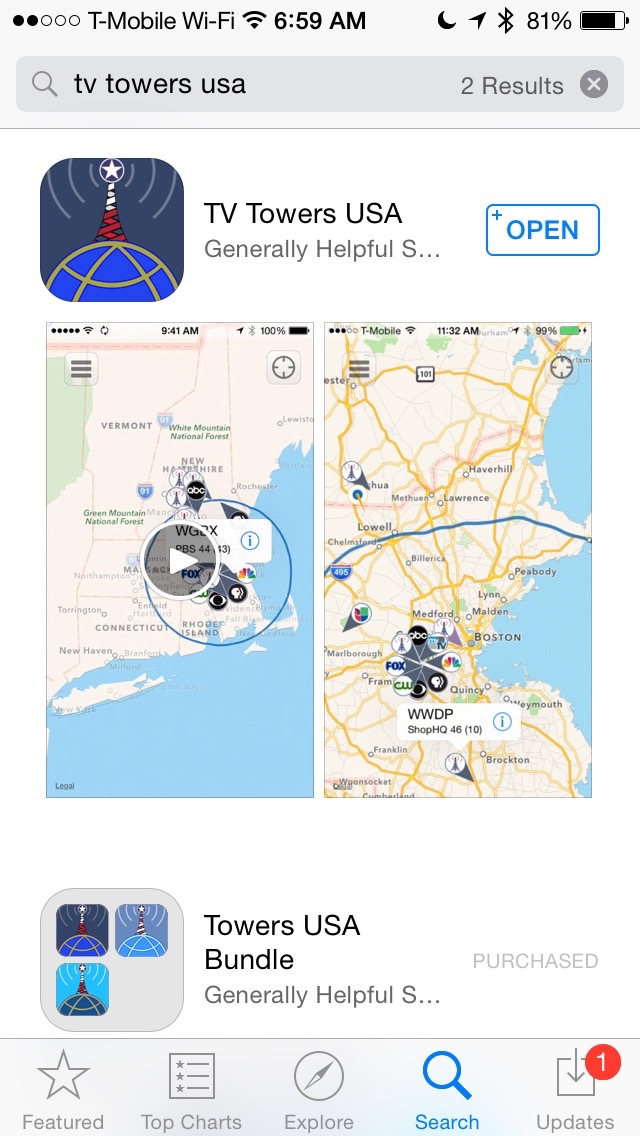
And here is what it looks like today (May 30, 2015):
May 30, 2015
Notice that the current version has no stars. Why, because on May 3rd I released a much overdue update which included bug fixes and updates to the database. Which means the new version has only one review, which means that potential customers can't tell at a glance that it's a decent product (lifetime rating average 4.58). Which means sales drop. April sales were $7.79/day, whereas since the update, they have been $4.70/day. (Obviously, I'm not quitting my day job for this product, either way.) 

The app gets a review every month or so, so it will be Autumn before I accumulate the 5 ratings needed to get my rating display back, and then it will be time for another update.

I don't understand how some apps accumulate thousands of reviews. It's true that I've avoided fame and fortune, but my niche apps are almost always well liked by the folks who purchase them. The problem is that only one person in a hundred will write a review, and small apps that are responsibly updated suffer for it, or allow people who post phony reviews to benefit. 

I was interviewing for a job last year, down in Cambridge, and one of the engineers looked over at me and asked suspiciously how I'd managed to get a perfect 5 for 5 for 5 users rating on the then current TV Towers.  The hard way, apparently. 

Monday, April 27, 2015

SVG Paths Tutorial

About a year and a half ago, I left myself a Reminder on my iPhone to make an educational video about creating path elements in SVG documents. I finally fired up ScreenFlow and did so. 27 minutes about me talking about the path element. It's more interesting than it sounds—how could it not be?


So hopefully, one or two of you will be out hand crafting your own SVG shapes like this one:

Tuesday, December 23, 2014

Reusing An Old Mac Mini

At every Mac hardware launch event, Phil Shiller will go through the features of the latest/greatest and towards the end will bring up the Environmental Checklist as at the 2012 WWDC when the MacBook Pro with Retina Display was introduced. “...and of course the glass and high grade aluminum is really desired by recyclers.” I don't know exactly what high grade aluminum means, but the aluminum in beverage cans costs $0.90/lb, so whenever I hear Phil say that I sort of shake my head at the concept of looking forward to turning a $2200 computer into maybe $3 dollars worth of scrap metal and glass.

I think we've all heard the mantra: Reduce, Reuse, Recycle. If we want to tread lightly with our resource usage, this is what we should do, in the order in which we should do it. Reducing is more important than reusing, and reusing is more important than recycling.

So this brings me to my little project to repurpose my wife's 2006 Mac Mini Core Duo. She'd run Windows on it for many years, and it had eventually just got too slow for a variety of reasons—no official Windows 7 BootCamp support, only 2GB of RAM, a bunch of junk getting installed. I replaced it with a 2012 Mini, and we hope to get at least an other 8 years out of the replacement. But this left me with an old Mac Mini which I knew to be slow, capable of at most running OS X 10.6.x, 2GB of RAM and 32-bit only software. It had a nice hybrid 1TB drive but only a SATA 1 bus. It didn't have much of a future, and the lack of software updates made me worried about even putting it on the Internet.

Apple had not gone out of its way to make this computer re-usable. It was close enough to the next years model Mini that it turns out you can just flash the firmware to turn it from a Mini 1,1 to a Mini 2,1 and raise the maximum RAM from 2GB to 3. Yet this is a Internet hack and not an automatic install.

An official Windows 7 Boot Camp driver set would have gone a long way towards keeping it in service in the first place.

The processor was a socketed Intel Core Duo. I was able to find a 64-bit Intel T7600 (2.33 Ghz), refurbished (i.e. reused) on Newegg and swap it out, making it a computer capable of running 64-bit OS X 10.7 Lion, and yet I had to jump through all sorts of hoops to install Lion on this box: I ended up booting my Lion capable early 2011 MacBook Pro off an SD card and mounting the Mini as a targeted Firewire drive to install Lion. Apple could have spent the engineering time to make this all automatic to any Mini with a 64-bit processor regardless of its provenance. It would have extended the lifespan of the Mini and reduced the resources needed to be a Mac user. I bought an extra license for Lion from Apple's website, although they don't send out DVDs anymore, I just downloaded the installer from my previously purchased items. 

Since I'd be in there replacing the CPU and upping the RAM anyway, I bought a Broadcom Crystal HD video decoder on eBay to replace the unused Airport card in the PCI-e slot, and put in a new clock battery. I also managed to break the audio board's ribbon cable port; so I ended up ordering a replacement InterConnect Board. The result is a reasonably fast machine, easily twice what I started with, although the memory access speeds and slow SATA bus keep it from living up to its processor. I'll either make it my daughter's computer, or use it as the HTPC in the TV room. It runs MythFrontend playing 1080p MPEG2 over the air recordings well, with the CPU/GPU temperatures barely above 100°F, extremely quiet. I've been trying a cheap Raspberry Pi running XBMC as an HTPC, and this Mini is more stable, responsive and flexible (it'd better be for the price). 


  • T7600 refurbished $75
  • 2GB SO DIMM DDR2 667MHZ RAM $27 
  • Broadcom Crystal HD Video Decoder $22 
  • Mac OS X 10.7 $20 
  • Thermal Paste, Nylon screws, etc. $5 (or so)
  • Replacement Interconnect Board $32 

So, a total of around $181 for a computer with such niceties as TOSLink out, Gigabit Ethernet, Firewire 400, a line in audio port, an infrared remote, slot loading DVD player, a real Intel 64-bit processor running OS X, but with such obsolete tech as SATA 1, USB 2, slow RAM, DVI and slow Intel integrated graphics. Presumably, I didn't really have to buy a 10.7 license, and I could have not broken my Interconnect Board, and maybe your software doesn't use the decoder. So, maybe $107 for a greatly improved experience. Perhaps you wouldn't buy a computer with these specs these days, but it feels good to reuse it instead of putting it on a shelf till the day comes to junk it. As this Mini doesn't have HDMI out, I needed a DVI+TOSLink to HDMI converter box do that was $30 and another 2W power drain—I already had all the cables.

And, I have to ask the question, what could Apple do to help me use less resources? Making computers that are easier to recycle or computers that are more easily reused? 


Update:
One major thing to take into account that I hadn't thought of earlier is energy efficiency. The 2014 Mac Mini is admirably energy efficient for an Intel system, drawing 6W idle. This hacked Mini running a non-approved firmware/OS and an unexpected processor draws 19W both while idle and asleep. Assuming I use it to replace my HTPC Raspberry Pi which draws 2W at most, I'm not being as resource conserving as I could or perhaps should. Which would be another benefit of Apple providing an official software stack update for this machine, I'd hope they could have gotten it closer to the 14W idle that a similar 2009 Mac Mini uses. 

At one time, I had a Dell Pentium 4 here in the house that I repurposed as a Linux server, but I felt obliged to replace it, not because it couldn't do that task,  but because its 110W idle power draw was ridiculously energy intensive. Any savings in money and manufacturing resources from keeping it was swamped by the long term cost to just keep it running. In that case, it made sense to me to replace it. This Mini, for instance, would have made a fine replacement for that P4 Dell as it is faster and has ⅙ᵗʰ the power draw at idle.

Another Update:
With the release of the fourth generation Apple TV, I can get a box capable of running a MythTV frontend that draws only about 1.5W maximum, so for now this old Mac Mini has been retired again. 

Friday, November 07, 2014

How to Insert Superscripts and Subscripts in Pages for iPhone

I'm trying to find customers for my Chemistry Keyboard extension for iOS 8, so I've been doing things like searching for questions people have asked on the web, the answer of which would be "Buy Chemistry Keyboard", and the title of this post would be one of the more common questions with that answer. I've tried it out on both my iPhone and iPad, and my keyboard will indeed insert superscripts and subscripts into Pages for iPhone and iPad.

So get it and you'll soon be quickly generating strings like:
2•Fe²⁺+2•H₂O→2Fe³⁺+H₂+2•OH⁻ 

Friday, October 31, 2014

Chemistry Keyboard - an iOS Keyboard Extension for Chemists


To learn a computer language, you have to write something in that language, just reading the book doesn't help much. So when Swift was introduced at WWDC, I had to assign myself a project to learn the language. As Apple also announced keyboard extensions, and I've long been kicking around the idea of a keyboard specifically made for Chemists—my degree field is Analytical Science, a branch of Chemistry—it seemed like a small enough project to get done in my limited free time.


Not that it was always smooth trekking. I could most certainly have written it faster in Objective-C, the Swift tools took a while to settle down; for a while I was killing the background syntax checking process every few minutes. But,  in many ways, Swift makes life easier; I'm particularly enamored with Swift enumerations, which turned out to be a powerful way to model my keyboard, and make my code extensible to writing different keyboards with just a few changes.

As for writing a Chemistry keyboard, I imagined what it would be like to write inorganic formulae such as:
2•Fe²⁺+2•H₂O→2Fe³⁺+H₂+2•OH⁻
So the first thing was figuring out what characters would be needed. Subscripts and superscripts of the numbers, +, -, (, ), and some arrows. And since I wouldn't want the user to waste time switching between keyboards, the common elements. Since Carbon is so common, along with Oxygen and Hydrogen, they'd get their own keys, but the other elements would have to be packed together in related groups or in one big grid.

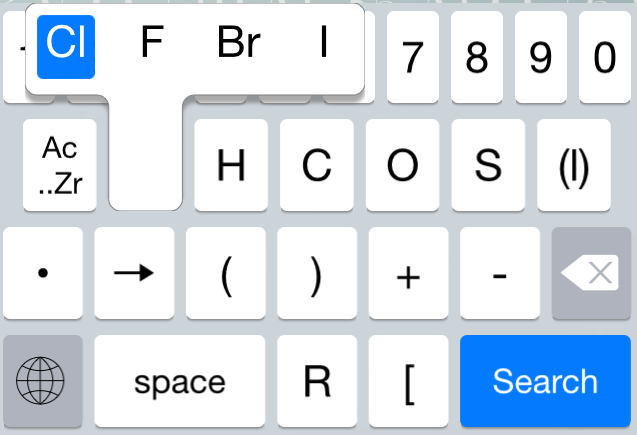
So the Halogens, the common ones, would share a key:
Just tap the key and slide right to choose one, or don't slide and get Chlorine.

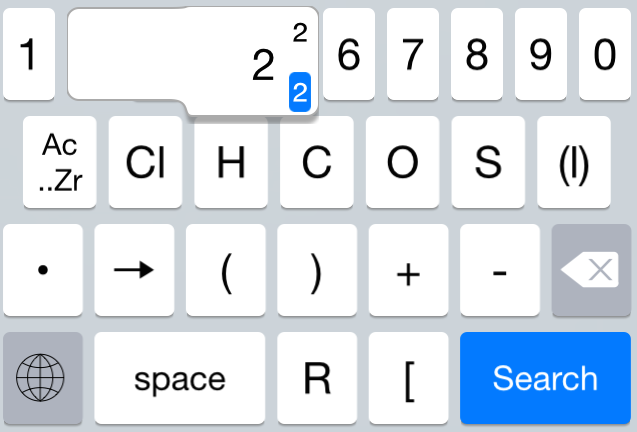
And as for superscripts and subscripts,
This is a tap and either a drag down for a subscript, or a drag up for a superscript. Very fast. You'll notice that the characters themselves are on a long tab, so as to not be hidden by the tapping finger. The appearance of the keyboard mimics the standard iOS keyboard, supports both regular and dark appearances, and even makes use of the 51 separate keyboard localizations for the word 'space' and the various name for the return key. Everything from 3 different flavors of Portuguese to Cherokee. 

One thing about gestures is that to select a character there does not have to be a one-to-one correspondence between movement and location. You don't have to drag your finger all the way across the screen to get to the last character in a flyout. The fact is that dragging is more accurate than tapping, given the right amount of feedback a drag can be half as long as the distance your selection covers. The user will quickly figure it out. 

Unlike many keyboard extensions, it doesn't need a network connection and switching out is a simple tap, not some complicated unlocking. I'm sure that it will take some more refining, but it actually came out pretty well.


Saturday, October 25, 2014

Why I Bought a 2012 Mac Mini over the new 2014 Mac Mini

Apple announced a new Mac Mini last week. I had been waiting for the news as my current situation leads me to program at my desk 95% of the time, making a desktop viable, and yet I don't feel I can justify a Mac Pro or the new Retina iMac. And as for a non-Retina iMac, I already have a beautiful Thunderbolt display, so there would be redundancy. So, I quickly bought the best Mac Mini available for my needs, the 2012 i7 quad core. Best Buy still had plenty of stock, but I doubt that will last, and the next day there was refurbished stock at the Apple refurbished store which was quickly gone (and presumably is mostly now on eBay) so I'm sorry I didn't wait.

As to why the 2012 is better for me than the 2014.

First of all, I'm coming from using an Early 2011 MacBook Pro 13.

Geekbench as measured by me on my own MacBook Pro i5 dual core @2.3Ghz

  • 64-bit Single-Core 2222
  • 64-bit Multi-Core 4819
In retrospect, being someone who makes a living coding, I probably should have gotten the i7 version of this computer. 

Look at the Mac Mini 2012 i7 quad core @2.3Ghz, again measured by me
  • 64-bit Single-Core 3110
  • 64-bit Multi-Core 11998
Primate Labs estimates the Mac Mini 2014 build to order i7 dual core @3.0Ghz
Pretty obviously, the 2012 quad core beats the pants off the 2014 dual core at multi-core and is almost identical at single core. And this is with a 2014 custom build to order that costs $1199 (with a 1TB Fusion Drive and 8 GB of RAM) versus a stock 2012 that costs $749 (with a 500GB spinning platter and 4 GB of RAM). 

I want to recreate the other specs of my MacBook, so I will move my 480GB SSD and 1TB hybrid drive over (I have a 2nd hard drive in the MacBook's optical bay). And I want to upgrade to 16GB. With the 2014, I can't do that. I can't put 2 2½ inch drives in the new mini. I guess I could order a 512GB SSD with the 2014 and void the warranty by installing my 2½ inch 2nd drive, I think. But this would bump the price up to $1499. 

Then there's the matter of the RAM. I have to buy it from Apple with the 2014. Bump the price to $1699.

To summarize.
With 2012 (and 2 drives I already own)
  • Stock i7 quad core $749
  • 16GB of RAM $136
  • OWC 2nd Drive Kit $29
  • 480 GB SSD (already own)
  • 1TB hybrid (already own)
  • Total $914
  • End product: Faster, 1 Thunderbolt port, 480GB SSD, 1TB hybrid, Intel Graphics 4000
If you don't already own the drives, this will be more expensive. 

With 2014 (and 1 drive I already own, which I can apparently install while voiding the warranty).
  • Build to order i7 dual core $1699
  • 1TB hybrid (already own)
  • End Product: Slower, 2 Thunderbolt ports, Intel Iris Graphics, 512GB SSD, 1TB Hybrid
The one thing that I wish I could get is 4K display support. The new Mini has Intel Iris graphics which are not only considerably faster depending on how you use them, but are also capable of driving 3840×2160@30Hz and  4096×2160@24Hz. The 2012 maxes out at 2560×1600@60Hz. [A commenter on Google+ points out that there is a hack to drive a 4K display with a 2012 Mac Mini.] As an Amazon Vine member, I get sent monitors for evaluation occasionally, and it'd be nice to be able to accept a 4K display. Regardless, no Mac Apple currently ships is future proof against the inevitable Retina Thunderbolt Display that will ship after Apple/Thunderbolt starts supporting DisplayPort 1.3, so the 2014 Mac Mini will not be driving 5K Retina displays. 

I don't care about the loss of the FireWire port.  I don't care about the improved WiFi as this will be hooked up via Ethernet. Another Thunderbolt port would be nice for driving either 2 largish monitors or getting maximum data throughput, but Thunderbolt is daisy chain able. And presumably, the PCIe SSD in the new Mini will be faster than the SATA III SSD I'll be using. 

Given what I'll be using it for: computationally intensive, non-graphically or throughput intensive Xcode development, the 2012 model was far and away the better value, and I'm almost saddened that Apple couldn't put together the kind of hot rod that a user like myself would find compelling.

[Update: I spent a couple hours this morning migrating my old hard drives into the new Mac Mini, and it is now my primary computer. Some quick performance tests versus my old MacBook Pro 13:


  • Case 1: A moderately sized Objective-C iOS Project from scratch (cleaned and caches deleted)
    • MacBook Pro i5 dual core  @2.3Ghz 44s
    • Mac Mini 2012 i7 quad core @2.3Ghz 27s
  • Case 2: A moderately sized Swift iOS project from scratch (cleaned and caches deleted)
    • MacBook Pro i5 dual core at @2.2Ghz 47s
    • Mac Mini 2012 i7 quad core @2.3Ghz 22s
So, my compiling/linking performance is on the order of twice as fast using the same hard drives, but different CPUs/RAM/SATA connectors. So, I'm pretty happy I went with the quad core. Sorry I don't have any measurements against the 2014 Mini.

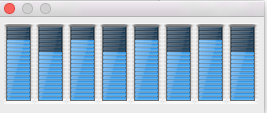
Oh, and here is a screenshot of the Activity Monitor applications 'CPU Usage' window when compiling an app, so the ability of the quad core CPU to have 8 concurrent threads is really getting a workout by Xcode 6.

]


Wednesday, September 03, 2014

On .Net Rocks Talking about the Swift Language

Last week, I recorded an episode of .Net Rocks about what it's like learning Apple's new Swift language. I think it went well enough, although I wish I could go 10 seconds without saying "you know", and I did go into the weeds giving my impressions of what motivates Apple.

An hour is just not long enough for the topic, and we only just did a very impressionistic coverage of the language.

Regardless, I thought it went fairly well, and worth the time to listen to.


Saturday, August 30, 2014

My Thunderbolt Display Started Flickering and Going Blank...

I had a strange experience over the week involving my local, Nashua, NH, Apple Store. It all started when my Apple Thunderbolt Display started flashing black rectangles and then going blank. As it did this with both my MacBook Pro and the family MacBook Air, I figured it was something wrong with the display. So, I booked a Genius Bar appointment.

I boxed up the display and took it to the mall. Sitting it on the Genius Bar, we weren't able to recreate the problem immediately with the Store's Air, so they took it into the back for observation. The next day calling to tell me that the panel had failed which would be an $833 repair, as this would be on a display that I could probably find for $900 if I searched online, and I would end up with a used Thunderbolt Display, I told them to scrap it and set about rearranging my home monitor situation. I have a Viewsonic monitor with an even nicer panel than the Thunderbolt that I could repurpose as my primary monitor, although I was not happy about losing the Thunderbolt's docking capability. 

And here comes the strange part. A couple days later, the Apple Store calls back to tell me that since they had the parts anyway, they had decided to try switching out the motherboard instead of the panel, and the resulting display was no longer showing the failure even after 6 hours of testing. So I could have my monitor back for $185. I jumped at that. I had been missing it. 

At the store, the Genius who took me my display told me the odd story that the original diagnosis of a bad panel was just the worst case scenario, and they hadn't been sure at the time. Which is definitely not what they had told me when I'd told them to scrap it. I had thought the symptoms I was seeing were pretty strange for a bad panel, and I'd argued at the time with the woman on the phone that it might be a bad power supply, and at the time she was adamant that it was the panel. So I had accepted the Store's diagnosis. 

So, I have my monitor back. Time will tell if the repair worked. I'm glad the Apple Store repair people didn't scrap it, and had taken the time to try something even after I had given up hope, but I have to wonder why they gave me such a bum diagnosis in the first place.

 [Update: well I've had it on my desk for a few hours and it's starting to go directly to a blank screen every few minutes, which is different than what I had been experiencing before where it was mainly large black rectangles followed by sometimes going blank . Plugging and unplugging brings it back. So maybe it wasn't the motherboard, or maybe this motherboard is going bad too. Hooking up a spare Thunderbolt cable to the Thunderbolt port on the display allows me to drive the monitor 'backwards', and I have not seen any blanking in a couple hours, so my current diagnosis is that the integrated cable is bad.]

[Update: After several days of driving the monitor 'backwards', I have seen zero problems. So I'll be heading back to the Apple Store to ask them to replace the Thunderbolt cable and give them a suggestion about testing before telling someone their $900 monitor is scrap worthy.]

Thursday, July 17, 2014

Some Old TV Show is Always the Most Recent on My Apple TV

In January, I purchased a copy of the 'Culture Shock' episode of 90 Day Fiancé.  And ever since it's been shown as the most recent episode whenever I select the TV Shows section on my Apple TV. Finally got sick of seeing it enough that I investigated, and it turns out that somebody mistyped 01/19/14 as 01/19/24 which means that unless somebody edits it, it'll be the most recent for the next 9½ years.

I contacted iTunes support and they got back to me wanting my order number for some reason when they could have just searched for the problem. Oh well, I hope they fix it.

[Update: after 5 e-mail exchanges, being asked to re-download the show (which made no sense) and 2 consultations with a manager, iTunes tech support let the producers of the show know about the error, and now my Apple TV is showing the appropriate image for the most recent TV show.]

Friday, June 06, 2014

Something in /var/folders is Preventing My Mac from Booting

A couple months ago, my MacBook Pro stopped booting reliably. It would just sit at the Apple screen and spin, sometimes all night. I could use the repair partition to re-install OS Mavericks and get back to work after a couple hours of downloading, installing, but it would get back to this bad behavior the next time I needed to reboot, which thankfully is not often. And safe mode booting didn't help same symptoms, so the problem wasn't in a cache known to safe mode.

I read on the support forums talk about the /var/folders directory which is used by the OS for some sort of caching. So this morning, when my son left my MacBook without its charger and drained it to the point of needing to reboot, I got another hang, and instead of two hours of reinstalling, I booted into the recovery partition, launched the Terminal app, cd into my normal boot partition, found the boot partition's /var/folders and deleted it.

And I then rebooted normally. So something in that folder is hanging up the boot process, I just don't know what.

Tuesday, May 20, 2014

On Making Sure You Test Against the iOS Versions You Support

I am not used to getting 1 star reviews against TV Towers USA. My small niche of RV enthusiasts are usually a happy lot. However, I made the big mistake of pushing an update (I guess the first one was 1.6) which was marked as supporting iOS 5.1 (i.e. the last for the original iPads) without testing against either a device—which I don't own—or the iOS 5 simulator—which Apple no longer provides. And it crashed on first launch, and if it had survived that crash it would have crashed again, and if it survived to finish launching it would have crashed on showing a detail page.

My father, of all people, had an iPod Touch still running iOS 5 that one of my sisters had given him, and he was nice enough to overnight it to me. It's not his favorite device; an iPhone without the phone he calls it.

Crash number one was probably the issue of iOS 5 not handling binaries which include a 64-bit compile. I had fixed that one in TV Towers USA 1.6.2 when I was blindly trying to fix the app.

Crash number two was at the linking stage. My own SVGgh library included a routine to build up an attributed string version of an SVG path and it had included a reference to the NSForegroundColorAttributeName constant string. Which wasn't available under iOS 5 and caused the app to exception out during launch with a symbol not found error. It isn't even used in this app, but the linker doesn't know that.

Crash number three was that some of my xibs were marked to be of the 6.0+ format instead of 5.0+ format.

And crash number four was that the table data source in the tower detail pane was using the category on NSIndexPath that returns an item instead of the archaic row property. This is a bit of syntax sugar made for use with UICollectionViews, so it, of course is not available under iOS 5.

Everyone of these issues was quickly fixable. And I failed my users by not keeping track of my supported OS versions and at a minimum running through the app before overwriting their existing, working copy.

And, I still don't have an iPad running 5.1.1, so I will just have to pray that there is nothing in the small amount of iPad only code with some similar present for me.

Sunday, May 11, 2014

On Dropping Support for the Original iPad

As an iOS developer, I'm often forced by my development tools to make support decisions. Xcode running on OS X 10.9 no longer allows me to run the iOS 5.1 simulator. Nor will it build an iOS app that simultaneously generates 64-bit instructions and supports iOS 5.1. Therefore, the version of TV Towers USA I just submitted for review (1.6.2) will be the last thing I'm likely to ever write which will run on the original iPad which maxed out at iOS 5.1.1.

I think the decision to limit the original model to 256 MB of RAM turned out to be a poor one on Apple's part as it shortened its usable lifespan hugely. If it had shipped with 512 MB, it would likely have gotten at least to iOS 6.  As it is, the last time I touched an original iPad, I was struck by how unresponsive it was compared even to my iPad Mini. Giving customers such a poor experience is not something Apple usually does, and I hope they've learned their lesson.