Friday, February 01, 2013

A Proposed Tweak to The Location Services Arrow

FTC Announces App Guidance

The Verge's description of the guidance is fairly ridiculous, there is no way people would put up with constant notification that their location was being accessed. The OS already does so with the little arrow icon towards the end of the status bar.

Since the government, the FTC, can't think of any productive way to prevent the criminally minded from doing bad things, they want to punish users by giving them a string of mind numbing, experience ruining dialog boxes. Well, if it will satisfy their inner nanny, I propose that Apple add to the variations of the arrow, they already have one for background location services, how about one that developers can set when they get a location and send that location to a server? 

So if I am a weather app, and I need to send my location or a proxy of my location (for instance a region around my location) to a server, I set a property similar to UIApplication's networkActivityIndicatorVisible property, maybe, a geolocationNetworkActivityIndicatorVisible property.  Then the OS can do something like change the arrow icon to something distinct like (2 minutes of Photoshop Elements):
Do I think this is useful? No. All this notify the user stuff does not beat the "doing nothing is a high standard" bar, but it's less obnoxious than a modal alert dialog.


[Update: I guess I should point out that none of my personal apps send geo-location back to my servers, nor do they contain ads, so they don't leak geo data that way either. AM Towers USAFM Towers USATV Towers USA, and Signal GH all make calls to Map Kit, so either Google or Apple at least could know somebody is interested in broad geographical regions, while FM Towers USATV Towers USA, and Signal GH ask the FCC website for contour data when you tap on an antenna pin, so the FCC would know somebody was interested in a given broadcast station, which might be 1000 miles from the phone with the given IP address which made the query. I don't think either of these cases would merit notifying the user, but Apple would have to give guidance should they adopt something similar to my proposal.]

Sunday, January 27, 2013

Wherein I Categorize American Radio Formats

For my AM Towers USA, and FM Towers USA mapping apps, I had to compress well over a hundred radio formats into a handful of categories (it ended up being 11) so here's the raw source:

    NSArray* listOfCategories =
    @[
    @[@"Ethnic Formats", @"Cajun Music", @"Adult Urban Contemporary", @"Black Gospel",@"Classic Hip-hop", @"Contemporary Latino", @"Hawaiian Music", @"Hip Hop", @"Hispanic Rhythmic", @"Hispanic Urban", @"Holy Hip Hop", @"International language", @"Latin American music", @"Latin Pop", @"Latino", @"Mainstream Urban", @"Merengue Music", @"Mexican", @"Native Americans in the United States", @"Polka music", @"Polynesian culture", @"Reggae", @"Reggaeton", @"Salsa Music", @"Soul", @"South Asia", @"Spanish Language", @"Spanish Adult Hits", @"Spanish Contemporary", @"Spanish music", @"Spanish Norteno", @"Spanish Oldies", @"Spanish Religious", @"Spanish Top 40", @"Spanish Variety", @"Tejano", @"Urban Adult Hits", @"Urban Contemporary Gospel", @"Urban Gospel", @"Urban Oldies", @"Vietnamese", @"World Ethnic"],
    
    @[@"News Formats",@"News"@"All News Radio", @"News/Talk", @"Classical Music/News", @"Public Radio", @"Weather", @"Public Broadcasting", @"Sports", @"BBC World Service"],
    
    @[@"Talk Formats", @"Talk", @"News/Talk", @"Christian Talk and Teaching", @"Conservative Talk", @"Hot Talk", @"Progressive Talk", @"Public Affairs Programming", @"Radio Reading Service", @"Sports Talk", @"Talk/Personality", @"Comedy", @"Educational", @"English Language", @"ESPN Radio", @"Home Shopping", @"Non-commercial Educational"],
    
    @[@"High Brow", @"Beautiful Music", @"Classical Music", @"Classical music/News", @"European Classical Music", @"Jazz and Classical", @"Jazz"],
    
    @[@"Country Formats",@"Country"@"Classic Country", @"Classic Country Music", @"Contemporary Country", @"Progressive Country", @"Current Country",@"Hot Country", @"Real Country", @"Mainstream Country", @"Modern Country", @"New Country", @"Texas Country", @"Today‘s Best Country"],
    
    @[@"Religious Music Formats", @"Religious Music", @"Black Gospel", @"Bluegrass and Southern Gospel", @"Christian Adult Contemporary", @"Christian Alternative Rock", @"Christian Contemporary", @"Christian Music", @"Christian Rock", @"Contemporary Christian Music", @"Contemporary Inspirational", @"Gospel Music", @"Holy Hip Hop", @"Inspirational music", @"Southern Gospel", @"Urban Contemporary Gospel", @"Urban Gospel", @"Worship music"],
    
    @[@"Classic American", @"Americana", @"Big Band", @"Bluegrass", @"Blues", @"Cajun Music", @"80‘s Hits", @"1990s in Music", @"Active Rock", @"Album Oriented Rock", @"Bluegrass and Southern Gospel", @"Children‘s Radio", @"Chillout", @"Christian Rock", @"Christmas Music", @"Classic Hip-hop",@"Classic Hits Oldies", @"Classic Rock", @"College Rock", @"Easy Listening", @"Gospel Music", @"Indie Rock", @"Jazz", @"Lite Rock", @"Mainstream Rock", @"Modern Rock", @"Smooth Jazz", @"Pop", @"Punk Rock", @"R&B", @"Rhythmic Oldies", @"Rock", @"Soft Rock", @"Soul", @"Southern Gospel", @"Southern Rock", @"Top 40", @"Tropical", @"Variety Hits"],
    
    @[@"Contemporary Music Formats",@"Contemporary"@"Adult Album Alternative", @"Adult Alternative", @"Contemporary Hit Radio", @"Contemporary Hit Radio/Pop", @"Adult Contemporary",@"Hot Adult Contemporary", @"Bright Adult Contemporary music", @"Adult Hits", @"Adult Standards", @"Adult Top 40", @"Adult Urban Contemporary", @"Alternative Radio", @"Chillout", @"Christian Adult Contemporary", @"Christian Alternative Rock", @"Christian Contemporary", @"College Progressive", @"Contemporary Christian Music", @"Contemporary Inspirational", @"Contemporary Latino", @"Electronic Music", @"Hip Hop", @"Independent", @"Mainstream Top 40", @"Modern Adult Contemporary", @"Modern Rock", @"Smooth Jazz", @"Pop Contemporary", @"Rhythmic Adult Contemporary", @"Rhythmic Contemporary Hit Radio", @"Rhythmic Contemporary", @"Rhythmic Top 40", @"Smooth Adult Contemporary", @"Soft Adult Contemporary", @"Spanish Adult Hits", @"Spanish Contemporary", @"Top 40, Hot Adult Contemporary", @"Top 40", @"Urban Adult Hits"],
    
    
    @[@"Religious Formats",@"Religious"@"American Family Radio", @"Catholic", @"Christian", @"K-LOVE", @"Christian Talk and Teaching", @"Fundamentalist Christianity", @"Modern Worship", @"Religion", @"Religious Broadcasting", @"Spanish Religious"],
    
    
    @[@"Hard to Categorize", @"Campus Radio", @"Alternative/Free Format/Adult Contemporary", @"Children‘s Radio", @"Christmas Music", @"College", @"College/Oldies/Country/Hip-Hop/Rock and Roll", @"Commercial broadcasting", @"Community Radio", @"Dance music", @"Diversified", @"Eclecticism", @"Educational", @"Freeform", @"High School", @"Home Shopping", @"Indie Radio", @"Mass Appeal", @"Music", @"Non-commercial Educational", @"Non-commercial", @"Student", @"Stunting", @"Urban Adult Contemporary Oldies", @"User-generated Content", @"Variety Hits"],
    @[@"NPR Affiliates", @"NPR", @"National Public Radio", @"NPR news, classical music, jazz"]
    ];

Sunday, January 06, 2013

Using Unicode and Emoji In Your Interface

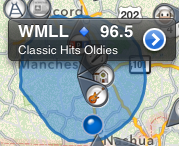
In my newly released iOS app, FM Towers USA—map of most of the FM radio stations in the United States—I had the problem of wanting to customize the popup indicator which appears when you select a pin on the map, but I didn't want to work too hard on it. All the MKAnnotation protocol in MapKit allows is returning strings for the title and subtitle.

I could spend a lot of time adding custom overlays and hit testing to how I deal with Map Kit, or I could just insert a few colorful Emoji characters into my strings.  (Unfortunately, I don't know how to get Blogger to encode the blue diamond character for view even on OS X or iOS.) 

- (NSString *)title
{
NSString* result = result = [NSString stringWithFormat:@"%@ 🔷 %.1f", self.callSign, self.frequency.floatValue];
return result;
}
You might notice that I even made use of the Emoji characters in the images I generated for my map pins. Thus the guitar emoji became the catch-all icon for music like rock, rockabilly, R&B, while the cow represented the various country genres—I wish their was an Emoji cowboy hat. Hey, it's free, quality colorful scalable artwork, I'd rather use it than draw it.

And sometimes, making use of the huge number of characters in standard Unicode can save a lot of time, let's say you need to display chemical formula like H₂SO₄ well,  you might think you'd need a complicated NSAttributedString to insert the subscript codes, but no, all you need is to use the subscripted number characters. Or maybe you want to say 4 1/2, but want to make it pretty, well let me introduce to you the vulgar half character with 4½. I don't know why it's vulgar, it's so beautiful and elegant and has a few cousins ¼ ¾ ⅓ ⅔ ⅕ ⅖ ⅗ ⅘ ⅜ ⅝ ⅞ ⅐ ⅑ ⅒, all of which you can just insert into your source code or localization files.

So, the next time you need an image lain out within a string, look under the Special Characters palette found at the end of Xcode's Edit menu. [Update: I've just realized that iOS 5 has many fewer, and much uglier Emoji style characters, so if you target that platform, please check out the results in the simulator.]

Monday, December 10, 2012

How to Ask for A Feature

A while ago, I complained about a rude request for a feature in How Not to Ask For A Feature. The flip side of this is this recent three star review for TV Towers USA.
Translators?
Not a bad app, very accurate and stable.

If I had one BIG complaint, this does not find TV translators and LP~LD (low power) stations.
 The reviewer was quite right this is a big problem. My only excuse for not adding translators is that I live in New England and translator stations are rare, but in the mountainous West, they are all over the place. So the next versions of TV Towers USA and Signal GH will include translator stations.

 And while I was mucking around in the FCC query pages, I noticed the feature of the FCC website where you can get contour plots in KML for most (some are missing) TV broadcast antennas. So that'll be in the next version too. The app will be greatly improved.

So thanks, Rnb4travel for the constructive criticism.

[Update January 29, 2013: after TV Towers USA 1.2 and 1.3 versions added translators, contour maps and searching, Rnb4travel posted a new 5 star review: “GREAT Improvements! Excellent app” so it all worked out.]

Monday, September 24, 2012

On Vectored Drawing In iOS Interfaces

As someone who spent spent seven years of his life writing a vectored drawing app, I have a deep rooted dislike of the bitmap. Bitmaps are bulky, bitmaps are inflexible. Bitmaps are a general pain. And yet oftentimes, it seems like many iPhone apps are drawn out entirely out of Photoshop.

Take this simple artwork from my iPhone app Signal GH. It formed the background of the graph forming the top portion of the app. I had drawn it in Photoshop Elements in less than 20 minutes.

And formed as in past tense, as I ripped it out this weekend as part of getting the app ready for the new 4 inch displays. Why, let's count the reasons.

  1. In this particular interface, the graph was the flexible element that made use of extra space when available and gave up space when needed. So, I would have needed a separate version for the iPhone 5/new iPod touch.
  2. I had not been handling the shrinking of the interface when a phone call comes in and the big green band comes down. Yet another flexible size needed.
  3. I needed artwork for Retina and non-retina, iPhone and iPad. With the addition of the retina iPhone, that's 5 different variants. 
  4. Should I decide to localize the app, the axis labels "signal quality" and "time" would require new versions per localization so 5n where n is the number of localizations. 
  5. It took up space. Not much but some. I take pride in that of the hundreds of apps on my phone, my apps, TV Towers USA and Signal GH are the second and third smallest behind an old flashlight app. 
So out went the UIImageView backdrop and in came a custom view with 3 subviews for the left axis, bottom axis and the graph itself, all lain out in the custom view's layoutSubviews handler. Here's the code for drawing the left axis:
@implementation LeftAxis
-(void)drawRect:(CGRect)rect
{
    CGFloat axisHeight = GetAxisHeight();
    CGFloat axisWidth = GetAxisWidth();
    CGRect myBounds = self.bounds;
    UIColor* strokeColor = [UIColor colorWithWhite:kGrayLevel alpha:1.0];
    
    CGContextRef context = UIGraphicsGetCurrentContext();
    CGContextSaveGState(context);
    CGContextSetLineJoin(context, kCGLineJoinMiter);
    
    CGFloat myWidth = myBounds.size.width;
CGFloat myHeight = myBounds.size.height;
CGContextMoveToPoint(context,myWidth, myHeight-(axisHeight-axisWidth)); CGContextAddLineToPoint(context, myWidth-kShaftWidth, myHeight-(axisHeight-axisWidth)); CGContextAddLineToPoint(context, myWidth-kShaftWidth, myHeight-axisHeight+kShaftWidth); CGContextAddLineToPoint(context, 0.0, myHeight-axisHeight+kShaftWidth); CGContextAddLineToPoint(context, 0.0, myHeight-axisHeight); CGContextAddLineToPoint(context, myWidth-kShaftWidth, myHeight-axisHeight); CGContextAddLineToPoint(context, myWidth-kShaftWidth, kArrowHeadLength); CGContextAddLineToPoint(context, myWidth-kArrowHeadWidth, kArrowHeadLength); CGContextAddLineToPoint(context, myWidth, 0); CGContextClosePath(context); CGContextSetFillColorWithColor(context, strokeColor.CGColor); CGContextFillPath(context); UIFont* textFont = [UIFont systemFontOfSize:kAxisFontSize]; NSString* signalQualityString = 
NSLocalizedString(@"signal quality", @"signal quality label on left axis");
     CGSize textSize = [signalQualityString sizeWithFont:textFont];
    
    CGPoint drawPoint = CGPointMake(myWidth-kShaftWidth-textSize.height,
                                    kArrowHeadLength+kArrowHeadWidth+textSize.width);

    CGContextTranslateCTM(context, drawPoint.x, drawPoint.y);
    CGContextRotateCTM(context, -1.0*M_PI_2);
    [strokeColor set];
    [signalQualityString drawAtPoint:CGPointZero withFont:textFont];
    CGContextRestoreGState(context);
}
@end

Notice that I draw the entire y-axis, including the protrusion of the x-axis in one continuous path using a single filled polygon. You might be tempted to draw the line segments as individual stroked lines and only fill the arrowhead, but experience tells me that as long as the color is the same throughout, there will be fewer problems if I just fill one contiguous path. For example, you won't get anti-alias artifacts between adjacent elements. Also note that the text is localized and positioned by its measured size and not a magic number. 

The net win here is that I don't have to keep multiple artwork up to date, my app is smaller, I can localize. The operating system can bring down the call bar without distortion, and I'm drawing at the intended resolution of the screen. 

Monday, July 02, 2012

Goodbye to Mobile Me

Well, I just spent an hour moving all the images for this blog from Apple's abandoned Mobile Me hosting to my new genhelp.com domain. Still probably not going to be blogging much going forward.

Monday, May 28, 2012

On Leaving ChemDraw

After nearly 7 years on the job, I've left CambridgeSoft/PerkinElmer. It wasn't done lightly, I'll miss my codebase. I hope Mac users appreciate the near-perfection of their PDFs or how you can call any command from AppleScript or the text clipboard comes out with subscripts intact, or any of a thousand little details I slipped in. All the way while fighting against time as Apple deprecated the technologies it was based upon.

But the job just got less and less of a deal over time: from working home 2 days a week, to having to commute to the office every day, from having flexible hours to having to show up for a scrum meeting every morning. From having stock options+salary to only having salary.

So, I waited for an iOS job to pop up where I live, and grabbed it. It's a fine thing to be a (good) iOS developer. There's always another job to be had.

Tuesday, April 17, 2012

Magenta Apple TV

Just a heads up. Sometimes the auto HDMI setting of the Apple TV (this is the case with both the 2nd and 3rd generation models) doesn't work right. I have a 7 year old Ölevi 720p IPS LCD, which I'm normally quite pleased with picture-wise, but it doesn't like the Apple TV's auto setting, which apparently defaults to YCbCr. Using either the RGB High or RGB Low settings results in a good picture.

Monday, March 19, 2012

new iPad takes 6 hours to charge

I purchased the 32GB model of the Verizon LTE iPad, and while it is a great box (see my review on Amazon), it does have its problems, the most glaring of which is that it takes 6 hours to charge from 0% to 100%.


Obviously, if Apple doubled the capacity of the battery while keeping the USB charging constant at 2.1A/5V, then something had to give and that thing was charging time. Oh, how I miss Firewire.

Thursday, October 13, 2011

iOS 5 Killed (Temporarily) my AT&T Tethering

It came back when AT&T tech support told me to go to Settings : General : Rest and hit the Reset Network Settings button. Which dropped my call to AT&T and caused my phone to sort of reboot, but when it came back up, there was my tethering option in the Settings : General : Network pane.

Sunday, July 31, 2011

Why Some Internet Plugins Stopped Working With Safari 5.1

When I was a junior developer working his first pro job in 1995, we didn't have Safari we had Netscape, and if we wanted to make the browser do something it couldn't do, like play a video or render a PDF, we wrote Netscape plugins against the NPAPI. I wouldn't say we were happy because the API was complex and fragile, but it was what we had. Come forward 16 years, and I'm dealing with NPAPI plugins again. It's only been in the last few years that interested parties have been actively improving to move the API to something that fits in better with a modern OS X browser environment.

Step one was a couple years ago, and involved removing the classic QuickDraw based drawing flavored plugin, replacing it with rendering into a browser provided Quartz context. This also tightened up the rules of when a plugin could draw--in response to a drawing event only--no more drawing while in a mouse tracking loop.

Second step was changing the event model, from one loosely modeled around the pre-Carbon event loop to one loosely modeled around the messages received by a Cocoa view. When Safari dropped support for the old event model between 5.0.1 and 5.1, a bunch of Internet Plugins just stopped loading.

Third step involves the use of Core Animation layers as a drawing environment instead of the Quartz context. Currently an optional drawing mode, the CALayer based model is much more powerful and convenient then the alternative, and I suspect will become the primary flavor of NPAPI plugins on "OS X". They might even allow for the sharing of code between iPhone apps, Mac applications and browser plugins if developers are careful to wrap them carefully—CALayers are the underlying drawing environment of both UIViews (iOS) and NSViews (OS X).

As Safari 5.1 is the default browser on 10.7, and it was recently pushed out to 10.6 users, there are probably a fair number of users searching for updates and tardy developers getting their mouse tracking code finalized. Including me.

Wednesday, June 15, 2011

Neato xv-11 Robot Vacuum

I have never been a regular vacuumer. I have a moderately priced vacuum I bought 20 years ago while in graduate school, and I've probably gone through all of 8 bags. However, I'm a home owner now, with kids, kids who bring in bits of sand, drop crumbs everywhere, methodically chop bits of paper into confetti, and generally make a mess. And a wife who's busy starting her own business. My floors need vacuuming.

I perked up my ears on hearing the new editor of Engadget say his favorite product review of all time was the Neato xv-11 robot vacuum cleaner. I had, of course, heard of the iRobot Roomba—and drive by the iRobot headquarters in Bedford, Massachusetts 5 days a week—but had never heard of the Neato. Reading through the Amazon reviews gave me a picture of a more robust product than the Roomba, with more cleaning per charge and a square face capable of doing corners. So I bought one.

I like it quite a bit, but it cannot operate in the chaotic child-infested environment of my home without supervision. The kids are likely to drop a brush fouling yoyo string or a pile of clothes right in front of its charging station so if I set it to operate on a schedule, I'm likely come home and find it stopped after half a room with something jammed in its brush or it stuck behind a moved space heater. Scheduled cleanings are for people who's houses are always neat.

I've found that the robot and I work best as a team. I'll take it down in the basement, start it going in one end and I'll start picking up in front of it, quickly getting much farther in front of it so that I can clean up the basement in 10 minutes while it takes 45 minutes to vacuum. I'll still have to come rescue it a few times as it will sometimes wedge itself under a piece of furniture or get its drive wheels lifted up, but this takes a few seconds and barely cuts into the labor savings of me vacuuming as thoroughly. It will leave a few things on the floor, it isn't a human that will go back and forth and back and forth over a clingy bit of paper until it finally does get sucked in, but frequent vacuuming quickly leads to pretty floors. I just wish it could climb stairs.

Noise is like a distant jet turbine, not as loud as my old traditional vacuum but enough to distract you from any productive work.

One major problem is that for whatever reason, the Neato does not keep its clock time, like a blinking VCR it can't be relied upon to keep a schedule.

The Neato differs from the Roomba in its approach. The Roomba uses a random walk algorithm to achieve coverage in a room. The Neato finds a path around the circumference of a room and then vacuums it in a grid; I believe this is more efficient and allows it to cover more area on a charge. The Roomba also has beacon lights you are supposed to setup to aid in navigation, the Neato uses an internal laser range finder to map rooms. Whatever it is doing, it almost always knows how to find its way back to where it started, and it has an amazing ability to follow curved surfaces, like the circular base of my recliner.

My wife is most happy with the fact it will clean under beds, picking up years of dust bunnies the first time and keeping it tidy going forward. I'm most happy emptying it's reservoir, seeing all that dust and dirt that was messing up my floors, getting my feet dirty, and potentially getting into my lungs, and sending it along to the landfill.

Saturday, June 04, 2011

Fear, Uncertainty and .Net

[Update: Mary Jo Foley has posted a blog entry saying that her sources are saying that .Net will be available for immersive Windows 8 development. If true, it'd be nice if Microsoft would actually come out and say that.]

Microsoft demoed the tablet application framework for Windows 8 development Thursday. Going forward, traditional apps written in C++, .Net and other legacy technologies will be available to tablet users but utterly painful to use while away from one's keyboard and mouse. You could see a bit of that in the conference video where the presenter fumbles several times trying to snap Excel's document window into place. Old apps are going to be dreaded while in tablet mode. People will need new applications, and combined with the new application store, some developer is going to make a bundle on a touchable version of Notepad.

Flashy new apps were presented written in HTML 5 and Javascript. The interface might look like the Window's Phone 7 Metro UI, but this is not the Silverlight based technology beloved by C# coders. Pure web technologies with no plugins have been embraced by Microsoft, and this is strange and unexpected to me as an observer.

Why is this strange?

One. Microsoft developers are going to go through Denial, Anger, Bargaining, Depression and Acceptance, but mainly anger if this is true. .Net programmers believe they have the best tools, language and framework—as odd as Cocoa programmers might find that belief—they really do. They also tend to have a distain for dynamic languages like Javascript, especially Javascript with it's odd object model, and not quite C syntax. And they've spent the last years mastering the C# language and the massively large .Net frameworks. Any platform company gets its strength from its developer community and this just seems gratuitously hurtful. Finally, they expected to be part of a gold rush to fill both a new Microsoft Windows application store, and custom development orders for the new platform.

Two. It is my impression that Javascript is not an appropriate language for large app design—although I could be convinced otherwise. It's possible that the Javascript part was what was working, and it would be appropriate for lightweight widget like applications like weather apps, twitter feeds, etc. At a later date, Microsoft could add support for other frameworks. This would be the same path as Apple took with the iPhone—web development first followed by native development.

Three. It is conversely and perversely possible that is .Net itself that doesn't scale well in performance at least, and wasn't up to the task of being scaled up from a little phone screen to 30 inch monitors, at least in how Microsoft's OS team would have used it. Presumably, if Microsoft could have released a version of Office built off the .Net framework, they would have. I've had some tangential experience with .Net and complicated renderings, and it hasn't been good, but I'd always assumed things would work out given time to optimize.

Fourth. It is unlike Microsoft, to want their developers to use easily portable technologies. To the extent Windows 8 Javascript and HTML5 isn't littered with calls to Microsoft extensions and framework, will be an indication of a surprising lack of strength on Microsoft's part to convince developers to make unhedged bets on Windows.

As I said perplexing.

And frustrating for anyone seeking to use a base of code across a range of platforms. At one time, a story was building up that you could write a chunk of code in C#, and execute it on the Mac and Linux via Mono, on Java platforms via a code translator, on Android via either Xamarin's .Net framework or a Java translator, on iOS via Xamarin, on Windows Phone 7 via Silverlight, and Windows 8 tablet via either SIlverlight or extensions to .Net. Maybe it wouldn't run well, and wouldn't compete with natively developed apps, but the story was there for project managers to believe. And now that story is sounding iffy.

This might just be a miscommunication. It seems insane for Microsoft to take such an odd route. Maybe when the whole story comes out, JavaScript+HTML5 is just a presentation layer and the bulk of an app will be written in .Net., maybe they just don't have the .Net code ready to demo. But whatever it is, Microsoft owes it to its developers to let them know now, because they can't afford to wait to choose technologies.

Thursday, May 19, 2011

Hint, You Want Your App to be Hard To Program

I come up with many ideas for iPad apps. I have almost zero time to write them, but I do come up with ideas every couple weeks. And when I take my vacation time, I'll write one. How to choose.

Well here's an idea. Choose the hardest one you can write in the time allowed, assuming you think it will sell. Hard means people will be agreeable to paying $5 for an app. Hard means you won't have cut rate competition the next week. Hard means you can be proud of showing what you are capable of.

iOS is filled with programming tasks that should be hard but aren't. Want to play a H.264 MP4 movie, it's like 5 lines of code. Want to play streaming broadcast MPEG2 off your HDHomerun, well that's hard (and probably involves getting an expensive license from Dolby for the sound amongst other IP fees) to do without hardware decoding. Nobody will pay you for the former, there are people who will pay for the latter. Then again, the latter might also be impossible on even an A5.

So I have my own hard idea, which I'm not sharing, and I'll be spending the summer writing it. I'll let you know how it turns out.

Wednesday, March 09, 2011

Setup of iPhone 4 Hotspot

I called AT&T as soon as I saw that iOS 4.3 had gone live. When I called, they had no information about setting it up and didn't seem to be ready for any influx of setup requests. But, eventually I was handed off to a technician and that person was able to find out the setup information.

So over the phone, they were able to convert me from my legacy unlimited plan to the monthly 4 gigabyte plan with hotspot. I received a text message saying the data plan had changed, and the hotspot button in the network section of the general settings pane allowed me to access the hotspot settings. I turned it on, changed the password, and saw that it worked fine with my MacBook Pro. I'm using it right now.

Pretty cool.

When I plugged the syncing cable into my MacBook Pro's USB port, I got a notification of a new network connection. For whatever reason, I had to restart the Mac System Preferences application to get the "iPhone USB" connection in the Network settings panel to connect. I will delete this connection, as I wouldn't want to accidentally spend data when WiFi is available.

The CNET Online Speed Test gave me 1288 kbps which is about what you'd expect for mid-day in Cambridge on AT&T.

A Facetime chat over the Internet to my iPod Touch from my MacBook Pro was surprisingly good. My wife in Nashua only looked a little pixelated and the audio was as good as it ever is.

I'm looking forward to dropping my iPad service, which will save me $15 a month off my old $30+$30 plans, and also allow my kids to use their iPod Touch in the car, and occasional use of my MacBook. I've never come close to using 2GB on either my phone or my iPad, so there is no real downside in terms of cost.


So a great service to finally have on iPhone.

Wednesday, December 29, 2010

On Keeping Politics Out of Non-Political Blogs

This is a blog about technology and programming, that is its mission, and why readers find it*. They do not come for my political opinions. As far as my readers are concerned, I don't have them. It would be betrayal of the trust between me, and whomever visits my blog to insert snarky little bits of politics. I certainly feel betrayed and imposed upon when an otherwise fine blog or podcast feels the need to sneak in something political; do it too often and that podcast is out of my iPhone, i.e., Grammar Girl. Same with blogs, i.e., Roughly Drafted.

This comes up because of the last several minutes of the Engadget Podcast of Christmas 2010. Now the Engadget Podcast is my favorite podcast, I will actually re-listen to some episodes. It can be very funny, although the Engadget Bingo thing is lame, and it's about gadgets, so what's not to love? Well, when Joshua Topolsky and Nilay Patel decide that doing their actual job of putting on a gadget podcast and making amusing pop culture references is too unimportant and start verbally abusing Paul Miller, who disagrees with them, but more to the point, would rather talk about gadgets.

If Joshua or Nilay would like to build up an audience for a political podcast, that would be swell**. But taking their pre-existing audience, who's only shared interest is the love of devices, and subjecting them to their views is a breach of the compact that comes from their podcast being listed in the Gadgets section of iTunes.

Is this post an imposition on my readers? Well a bit. In it's defense, it is a meta-post about political content, not that content itself. And I have few frequent readers to offend.


* I'm not claiming I have regular readers, or many readers. I have people Googling specific technical problems and never coming back. If I'm lucky, this post will be read by a couple friends of mine, as it serves no practical purpose other than me venting.

** I wouldn't actually listen to such a podcast, because for whatever reason I have no interest in podcasts or TV shows about politics, although I read a large number of political blogs.

Tuesday, December 21, 2010

On The Need for MonoMac

I continue to listen to the Dot Net Rocks podcast even though I've yet to write a line of C#. It is a well done and even handed podcast, and one of these days I shall write a post about how the hosts demonstrate weekly how one can advocate a technology while maintaining credibility. But this post is about MonoMac, which I haven't used but someone at my company is, and I go to the meetings. If this means I'm writing without enough facts, then this might be a blog.

[Update: I've been informed that what I've written below is not possible in MonoMac. Apparently, the MonoMac developer community cannot imagine the concept that C# isn't the solution for every programming situation. I am not a publicly profane person, but I'm tempted here. But please keep on reading about an alternate universe where programmers don't fall in love with a language at the expense of reason.]


Tireless advocate for all things Mono, Miguel de Icaza was on the show this week and he got me thinking about why anyone would use MonoMac. And I do think many people will use MonoMac, but (I hope) not for the reasons Mr. de Icaza gave on the podcast.

To summarize de Icaza's pitch for using MonoMac. If you love C# and managed code, then you can use your favorite language to write Mac applications. You'll have to do at least some work outside your beloved Visual Studio, and you'll have to use completely unfamiliar APIs but at least it'll be in C#. And you'll get to use the whole Cocoa API, plus various other OS X technologies like Core Audio, Core Animation, etc., but they'll be wrapped in C# shims. Oh, and you'll get a strongly typed language instead of the horrors of dealing with the chaos of loose typing.

As someone who's spent his professional life writing cross-platform code, this is a really bad and limiting sales pitch. It is pitched at people who just don't want to learn another language for whatever reason, but would be willing to learn the entire OS X API, except trapped in a language for which it's calling syntax becomes cumbersome.

First, of all, you have to realize that the Objective-C language is small. It is not C++, which even a professional coder might never learn in its entirety. It is a elegant little language which adds object oriented extensions to C. The fact that you spend most of your time using those extensions doesn't make them any more verbose. It has had some further extensions in recent years, but it is still reasonably compact.

Also realize that the OS X APIs are huge, composed of literally thousands of messages, methods, structures, enumerations and constants in dozens of frameworks. I've been programming on OS X for a decade, and Apple adds APIs at a rate faster than I can learn them.

So, MonoMac saves you the trouble of learning a small language, while expecting you to master a large API which has been transmogrified to make sense to C# programmers. And the vast majority of the documentation and forum postings for that API assume it is in another language. That's not much of a pitch.

I used to work on a karyotyping application when I was living in suburban Chicago. It was Mac/PC and was written in C++. 90% of our code was shared between the platforms. We used standard application frameworks, at the time PowerPlant and MFC which relieved us of maintaing code every application uses, and gave us a lightweight entry into native appearances and behaviors. Almost all the document data structure and rendering code was cross-platform. So 10% of the code was dealing with the user facing part of the application or calling into native operating system services and the rest was vanilla C++ dealing with an abstract environment.

Consider a typical Model-View-Controller design. If one has a shared language like C# running in Mono, then we can factor our code such that all or almost all of the Model code is in shared vanilla C#, some or even most of the Controller code can be written in C#, although I'd prefer that Objective-C be used for Controllers on the Mac, and the bulk of the View code is no code at all, but what you get from the framework by using standard widgets, windows and other classes using the provided GUI tools. Basically, you want the framework to handle everything outside your document frame in your window. Depending on the application, you can have very high code reuse, or less if you need high performance access to operating system services, such as the example de Icaza gave of using the Audio Units API for sound processing. Regardless, this should be abstracted away and created with factories to make it callable from vanilla code.

So you'd end up with 4 kinds of code:
Vanilla C# that doesn't do much beyond manipulate vanilla objects and simple types, and implement various abstract interfaces or protocols.
Windows specific C# that makes use of Windows frameworks
MonoMac specific C# that makes use of native Mac services
Objective-C for Mac specific GUI code and isn't as awkward as C# would be.

For a lot of applications the first kind can be the bulk of code.


This takes discipline but it results in a more maintainable, focused code base.

I think that's a better pitch.

Not that I'm advocating it, I haven't tried to see if my decade old experiences with cross-platform design are transferable to the Mono runtime environment. Nor do I think Mono has proven itself enough for risking a project on it. I was floored that such a well known project only has 200 or so active users.

And I like Objective-C, it's a lot of fun.

Wednesday, November 03, 2010

Logitech Still Sells the Z-5500

I just yesterday replaced the decade old Logitech Z-5500 Digital speaker system in my TV room. It had spent several years on my desk when I had an apartment, and then spent the last 5 years giving surround sound to my house. It gave me reliability and a nice set of inputs. As a gadget guy, I'm just shocked that something as archaic is still being actively sold. Go look at its specification page and it touts its “Analog stereo-mini (on side panel of control center) for portable CD, MP3,or MiniDisc® players”. Now that's a blast from the past, the MiniDisc and portable CD player.

I replaced the Z-5500 with a Denon AVR 591 which is a real receiver with modern HDMI ports, modern audio codecs and an auto calibration system. Still, I am going to miss the conveniently small control module of the Z-5500.

Thursday, September 30, 2010

New version of Signal GH

Just got a note from Apple saying that a new version of my Signal GH iOS app to monitor over the air TV signal quality with HDHomeruns was approved. Which is good. I make little money on the product, but I like tweaking it.

It has two major features: an iPad layout and a map of broadcast towers in the United States (sorry Canada).
Both of these features were a lot of fun. The size of an iPad screen is luxurious and freeing. In this case, I just scaled everything up, as I think the tabbed interface works for this particular application. It might have been more iPadish if I'd put the settings in a popup control, but I felt people would be spending a good amount of time in setup, and would get nervous spending too much time in a spring loaded widget. Other iPad apps I've written have gone whole hog for using popups for accessing functionality.

The map was a joy to create. MapKit is a great example of a framework that Apple just gets right. Getting my TV towers from a Core Data database to the screen could not have been easier due to the flexible use of protocols and categories. However, the standard drop pin wouldn't work because TV stations tend to share a single tower. So I went with a custom flower petal annotation giving me room for 7 major networks and a generic logo.

Compass support was nearly as easy, although I did have to use my own custom annotation for that, when it would be nice just to set a flag and have it added. On the other hand, I felt the standard radar wave animation for the user's current location was too distracting and brought attention to the wrong detail, so I replaced it with a more static graphic merged with the compass.

Thanks to my sister, Sarah Howes, for doing the research needed for populating my TV station database.

Wednesday, September 15, 2010

Finally! Apple Embraces A Standard for Metadata in PDFs

I draw your attention to the header file CGPDFContext.h in the iOS 4 SDK:

void CGPDFContextAddDocumentMetadata
(CGContextRef context, CFDataRef metadata) CG_AVAILABLE_STARTING(__MAC_10_7, __IPHONE_4_0);


The iOS 4 SDK has been out for several months but I hadn't noticed this change until today. Not that I have any use for it today on iOS, it's on the Mac where it is crucially needed.

Starting with Mac OS X 10.7, developers will be able to embed arbitrary XML data in the PDFs they can generate with Apple's APIs. [Update: I guess there is no actual requirement of XML based on just the API. I'd recommend standardizing on XML though.] They have decided to use the method advocated by Adobe in which a metadata stream object with a compressed XML payload is inserted into a PDF (Apple does the compression for you, you just have to provide a block of XML data). This is a good way of doing it, but more importantly, it is a simple and standard way of doing it. I would have preferred having an additional vendor tag where I could mark the metadata with a "com.genhelp.mydrawingapp" identifier, but that is not crucial; I can get that data from the XML.

Why is this Important?

As I've explained several times before, on the Mac we used to have this feature which I will call Round Trip Editing, wherein a user could make a drawing in one application, copy and paste the drawing into another application, and then later copy and paste back into the original application, and still be able to edit the drawing. Generations of Mac users relied on this feature to go from applications like ChemDraw into PowerPoint and back again.

This feature has been lost as applications transition from using the archaic PICT clipboard flavor to the modern and beautiful PDF clipboard flavor. There was no direct way to embed large data in Apple generated PDFs, and thus developers were left on their own to munge the format if they dared. And, with no standard or expectation of data embedding, applications did not bother to preserve the original PDF resulting in data loss.

Getting round trip editing working again has required 3 steps. Apple has had to provide an API for data embedding. Content generating applications have to be modified to use that API. Office applications have to be modified to return original PDFs to the clipboard when selecting a single image. With Mac OS X 10.7, step one will be here; about 4 OS versions tardy.


BTW Here is how to call it:

CFDataRef MakeAPDF(CFDataRef someXML)
{

CGRect mediaRect = CGRectMake(0, 0, 400, 600);
// use your own rect instead

CFMutableDataRef result = CFDataCreateMutable(kCFAllocatorDefault, 0);
CGDataConsumerRef PDFDataConsumer = CGDataConsumerCreateWithCFData(result);

// mark the PDF as coming from your program
CFMutableDictionaryRef auxInfo = CFDictionaryCreateMutable(kCFAllocatorDefault, 1, NULL, NULL);
CFDictionaryAddValue(auxInfo, kCGPDFContextCreator, CFSTR("Your Programs Name"));
CFDictionaryRef auxillaryInformation = CFDictionaryCreateCopy(kCFAllocatorDefault, auxInfo);
CFRelease(auxInfo);

// create a context to draw into
CGContextRef graphicContext = CGPDFContextCreate(PDFDataConsumer, &mediaRect, auxillaryInformation);
CFRelease(auxillaryInformation);
CGDataConsumerRelease(PDFDataConsumer);

// actually make the call to embed your XML
CGPDFContextAddDocumentMetadata(graphicContext, metaData);

CGContextBeginPage(graphicContext, &mediaRect);
// do your drawing, like this grey rectangle
CGContextSetGrayFillColor(graphicContext, 0.5, 0.5);
CGContextAddRect(graphicContext, mediaRect);
CGContextFillPath(graphicContext);
// end your drawing

CGContextEndPage(graphicContext);
CGContextFlush(graphicContext);
CGPDFContextClose(graphicContext);
return result;

}

And here's how to get the data back. Check that the XML is yours instead of some other program's.
CFDataRef ExtractMetaDataFromPDFData(CFDataRef pdf)
{

CFDataRef result = 0;

CFRetain(pdf);
const UInt8 * pdfData = CFDataGetBytePtr(pdf);
CFIndex pdfDataLength = CFDataGetLength(pdf);
CGDataProviderRef dataProvider = CGDataProviderCreateWithData(kCFAllocatorDefault, pdfData, pdfDataLength, NULL);
CGPDFDocumentRef pdfDocument = CGPDFDocumentCreateWithProvider(dataProvider);
CGDataProviderRelease(dataProvider);

if(pdfDocument)
{
CGPDFDictionaryRef docDict = CGPDFDocumentGetCatalog(pdfDocument);
CGPDFStreamRef metastream = 0;
if(CGPDFDictionaryGetStream(docDict,"Metadata", &metastream))
{
CGPDFDataFormat format = CGPDFDataFormatRaw;
CFDataRef streamData = CGPDFStreamCopyData(metastream, &format);
if(streamData)
{
if(format == CGPDFDataFormatRaw)
{
result = streamData;
CFRetain(result);
}
}
}
CGPDFDocumentRelease(pdfDocument);
}
CFRelease(pdf);

return result; // check to see if this is your XML
//remember to release result when done

}