Saturday, October 26, 2019

Thunderbolt Display Life Extension: An Environmental Proposal for Apple

I recently replaced the power supply and data cable on my Thunderbolt Display to keep it working with its 5th Mac.  I know from experience that the original cables go bad, especially from MacBook Air users having to put too much stress on the cable being plugged into both sides of that laptop.  I personally wore out 2 Apple original cables when the strain relief around the data cable failed. So time for a replacement. Although I could have just used the auxiliary Thunderbolt 2 port on the display, I was in refurbish mode, and was opening the display up anyway.

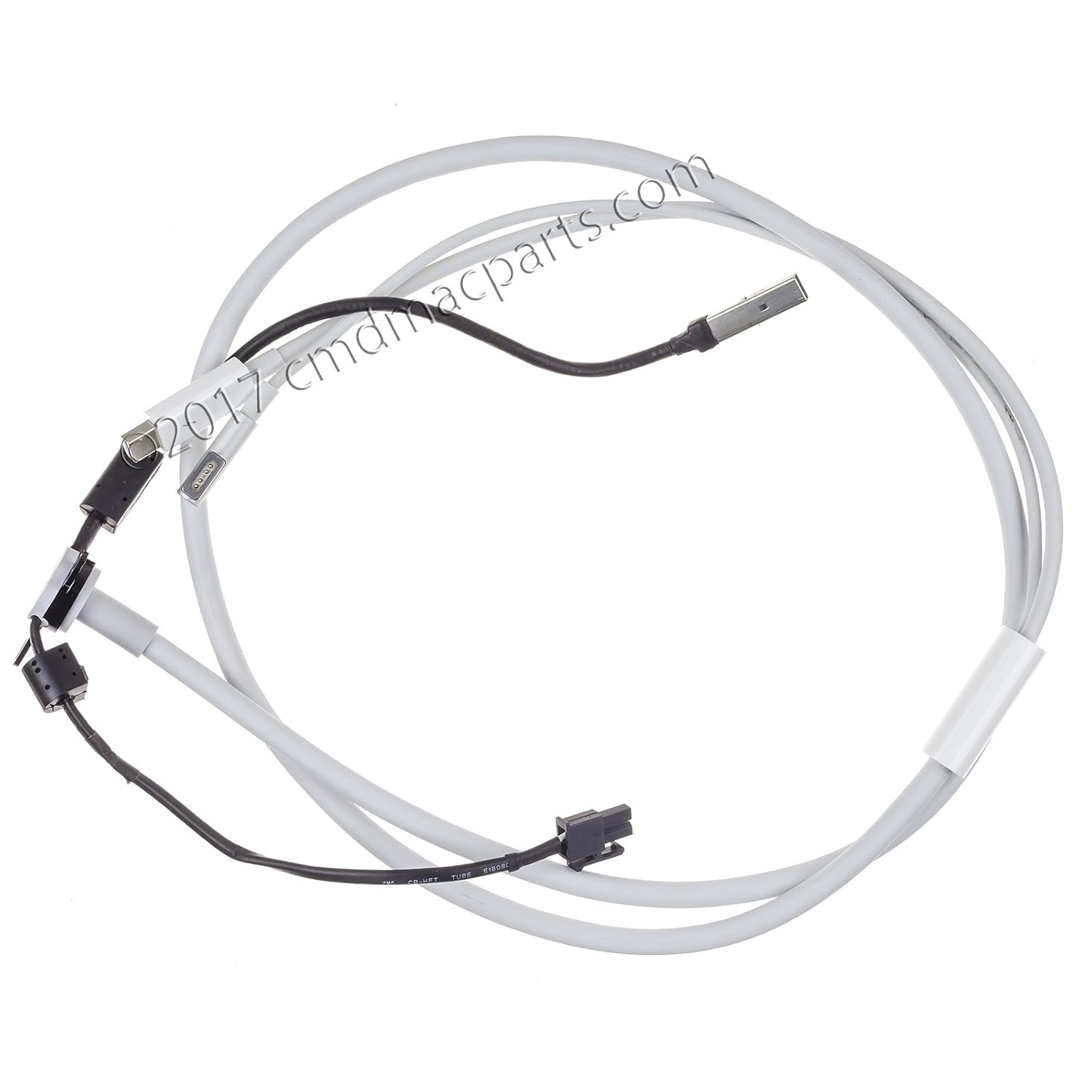
Here's the cable I found on Amazon. Like the original it has a MagSafe 1 power connector and a Thunderbolt via Mini DisplayPort data connector. Which would be great, if I still used a 2015 MacBook Pro.
Thunderbolt Display Cable Replacement
But I have a 2018 MacBook Pro which has no MagSafe and has 4 Thunderbolt over USB-C ports. So, I purchased a separate Thunderbolt 2 to Thunderbolt 3 adaptor from Apple for $49: 
Thunderbolt 3 to Thunderbolt 2
Thunderbolt 3 to Thunderbolt 2 Adaptor

And I had to provide my own $79 power supply, despite the fact that I now have a new 250W power supply in my Thunderbolt Display which would be perfectly capable (I would think) of driving both the display and my laptop. 

I could have ripped the whole cable out and replaced. it with a Thunderbolt 2 cable, as the inside connector is just a Mini DisplayPort jack, just like the other end. I could have even put a short Thunderbolt 2 cable inside the case, attached to the adaptor and brought out a Thunderbolt 3 cable through the opening in the case, but I wouldn't have power over that cable. What I want is a one cable solution. 

Here is my proposal to Apple. Create a replacement cable assembly that ends up with a powered Thunderbolt 3 USB-C port embedded in the opening currently occupied by the MagSafe/Thunderbolt 2 cable. Enough with embedded cables that go bad with inadequate strain relief. Put a port in the back of the display to make it easy to replace future cables. Charge $129 for it, and I will buy one, I promise. 

Apple is always claiming to lead the way environmentally, but they are allowing 100's of thousands of otherwise functional monitors to go out of use before their they have to. They don't even sell a monitor in this price region anymore.  They brag about using "recycled" aluminum in their lower end products, but have this golden opportunity to keep equipment working and not being recycled and landfilled.

Saturday, October 12, 2019

Chirping Thunderbolt Display, Time for a New Power Supply

My Thunderbolt Display started chirping when attached to a computer a few months ago, and then a few weeks ago, it out and out died.

Now, I am fully aware that this monitor is extremely obsolete with its USB 2 ports, moderate resolution and Thunderbolt 2 connectivity. But, it is still an attractive, accurate monitor with lots of connectivity. So, I deemed it worth it to spend $139 on a replacement power supply. Also needed some suction cups to pull the front glass off. It was a good task to assign my son, although we nearly broke the internal cable connecting the motherboard to the LCD panel.

Also bought a replacement power+data cable as the strain relief had failed a long while ago, leading me to use the passthrough Thunderbolt 2 port to connect to the monitor. I could probably have gone without this expense.

It would be great if someone manufactured a replacement cable that incorporated USB-C + Power + Thunderbolt 2 to Thunderbolt 3. There are a lot of these monitors out there. Where I work, these legacy monitors are coveted by anyone assigned a normal corporate purchase monitor. A swap in cable replacement would make them practically perfect.

Everything worked although I did manage to snap the screw holding the grounding wire to the external cable, so I had to do a bit of a solder hack. And now, I have my beautiful Thunderbolt Display back on my desk.

Saturday, October 05, 2019

Wherein I Represent the Early Internet

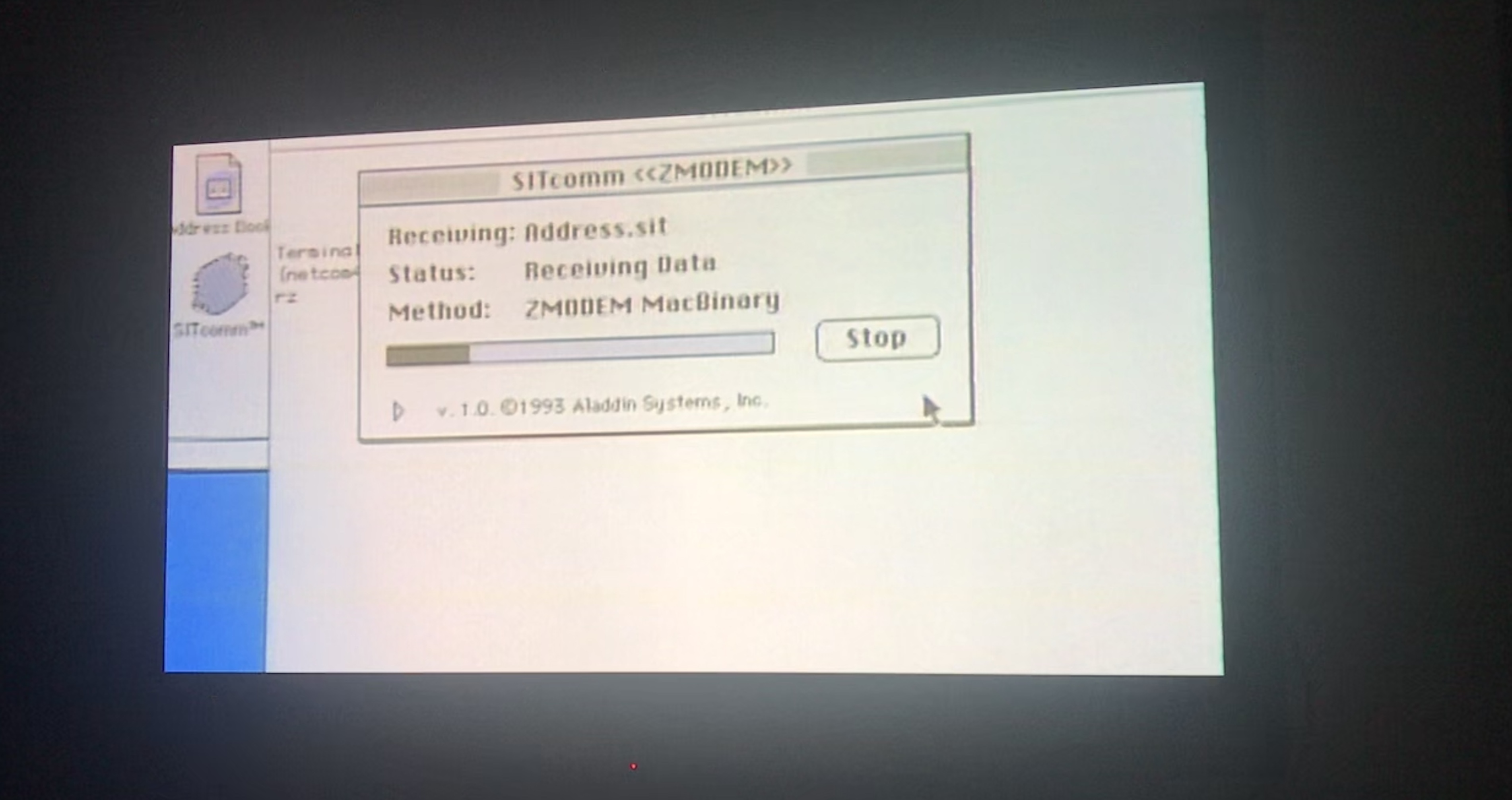
I was just watching the documentary about the long ago startup, General Magic, when about halfway through, they show a sequence representing when the Internet entered public awareness. And what do they use to represent the pre-browser era, but the ZModem tool I wrote for Aladdin Systems when I was in grad school.

Ironically, I don't think it was widely used over the Internet, but was generally used for BBS downloads.

Something to proudly show the kids.

Tuesday, July 02, 2019

Textual Representation of SwiftUI Paths

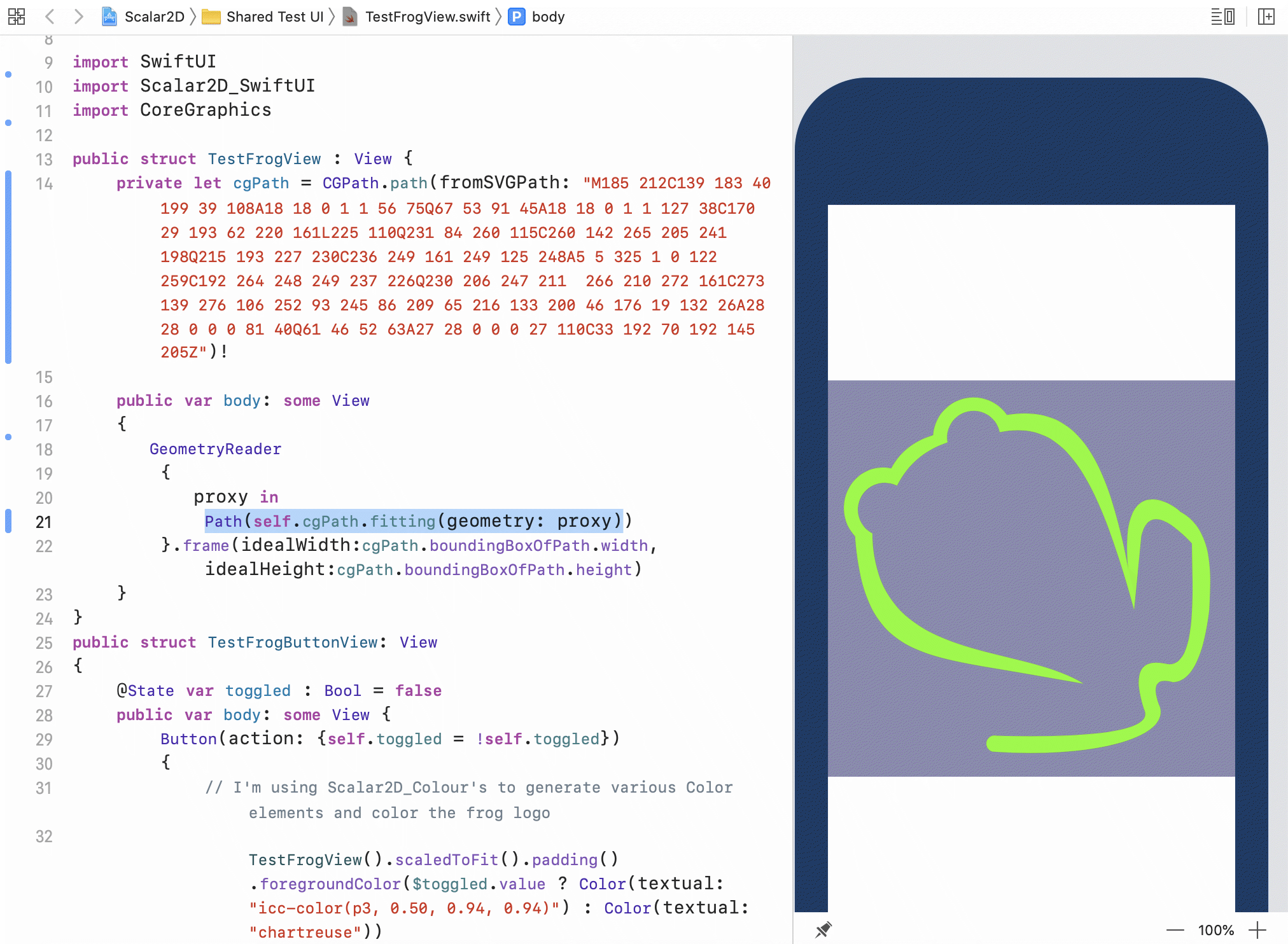
While on vacation, I've been creating my first Swift Package, for my incomplete Scalar2D project. While my major ambitions have been slow, it does have 2 useful features: it supports many ways to represent colors as strings, and it can generate 2D paths from standard SVG path element strings.

So you can write:
import SwiftUI
import Scalar2D_SwiftUI
import CoreGraphics

public struct TestFrogView : View {
    private let cgPath = CGPath.path(fromSVGPath: "M185 212C139 183 40 199 39 108A18 18 0 1 1 56 75Q67 53 91 45A18 18 0 1 1 127 38C170 29 193 62 220 161L225 110Q231 84 260 115C260 142 265 205 241 198Q215 193 227 230C236 249 161 249 125 248A5 5 325 1 0 122 259C192 264 248 249 237 226Q230 206 247 211  266 210 272 161C273 139 276 106 252 93 245 86 209 65 216 133 200 46 176 19 132 26A28 28 0 0 0 81 40Q61 46 52 63A27 28 0 0 0 27 110C33 192 70 192 145 205Z"
)!

    public var body: some View
    {
       GeometryReader
        {
           proxy in
            Path(self.cgPath.fitting(geometry: proxy)).strokedPath(StrokeStyle(lineWidth:3.0))
        }.frame(idealWidth:cgPath.boundingBoxOfPath.width, idealHeight:cgPath.boundingBoxOfPath.height)
    }
}

Scalar2D_SwiftUI package in action

One thing, I found out after putting the package together was that the SwiftUI path has a String representable form of its own. You can pass it a specially formatted string and it will generate a Path struct.

Thus, an SVG Path to make a heart in a circle:
"M 0 0 A 100 100 0 0 0 0 200 A 100 100 0 0 0 0 0 Z M0 45 C 63-23 171 87 0 200 C -171 87 -63 -23 0 45 Z"
Simple SVG of a Heart in a Circle
Can be represented by a SwiftUI Path representation of:
0 0 m  -55.2285 0 -100 44.7715 -100 100 c -100 155.228 -55.2285 200 -1.83697e-14 200 c  55.2285 200 100 155.228 100 100 c 100 44.7715 55.2285 0 6.12323e-15 0 c h 0 45 m 63 -23 171 87 0 200 c -171 87 -63 -23 0 45 c h 
Which is probably just a direct translation of the underlying CGPath, which does not have an explicit arc element, so the arcs that made up my circle—the "A" operands—got converted to the "c"  cubic Bezier operands. The stringRepresentation property on Path tends to add unneeded short line segments after moves, which is also probably an artifact of iterating through the CGPath to generate the text. 

You could use the included Path(string: String) constructor to generate text from shapes, but SVG paths have the advantage of being generated by common drawing applications, and having more features such as arcs, shortcut operands and relative coordinates. I'm not sure why Apple didn't choose SVG paths when deciding on a text format, but please give my Scalar2D Swift Package a try. 


Monday, March 04, 2019

Optimizing a TV Antenna with an HDHomerun

I get asked by users of my Signal GH iOS app for the HDHomerun network TV tuner what measurement they are supposed to improve as they adjust their TV antenna systems.  

The HDHomerun provides 3 metrics describing the data stream coming from the over the air antenna: 
  1. Signal Strength
  2. Signal to Noise (or Signal Quality)
  3. Symbol Quality
I've been thinking about the analogy of someone with a noisy hearing aid trying to understand someone talking in a noisy room. From this way of thinking, Signal Strength is either turning up the volume or moving closer to the talker. It's how loud the voice is to the listener. The problem with this is, that the signal might be too noisy or maybe you are boosting as much noise as signal, or making it so loud that it's painful. Some gain might be useful, but just ramping up the Signal Strength has its limits. 

In this analogy, Signal Quality is how noisy the voice is when it gets to the listener, if the hearing aid is high quality, or the room is naturally quiet, even a fairly quiet talker can be understand. You might try buying a better aid which can add gain without adding additional noise, or move closer to the speaker. 

Finally, Symbol Quality is a measure of did you understand all the words the speaker said. If not, your understanding can be severely distorted. When it comes to digital TV, you either understand everything perfectly or the picture pixelates. So, when it comes to Symbol Quality you want 100% perfection, nothing else will do. This is why I show it as either a green filled circle ⬤ or a red ring  ⭕️ and don't bother to show the Symbol Quality number.

As you can see, I'm prodding you to understand that while some Signal Strength is necessary, and Symbol Quality perfection is mandatory, it is long term Signal Quality that you want to improve. This is why Signal GH graphs Signal Quality over time, and not the other two metrics. If you can get the Signal Quality consistently above, let's say, 80, this will lead to getting perfect Symbol Quality  so your job as an antenna system optimizer is to find out what steps it will take. 

In my case, several years ago, I went through the process of getting bigger and bigger quality UHF only antennas, on taller masts, using a quality UHF pre-amp, and using my Signal GH app to find just the right direction to point the antenna—actually I used more primitive tools in the beginning and it's what led me to develop Signal GH. With each step, signal quality for each of my local stations increased, and each would eventually have such consistently high signal quality that the Symbol Quality would pretty much never dip below 100% perfection. Initially, I pulled in 2-3 stations good enough to watch without pixelation, and now I have 8-9 with dozens of sub channels, including every major. It's a rare—and usually blustery day—when my picture breaks up. I have an advantage in that all the stations I'm interested in are in the same general direction, or are close by, so I didn't have to resort to exotic antenna configurations: just bigger and taller. 

One thing I like about networked TV tuners, like the HDHomerun, or the Tablo, is that since they are shared resources, I don't have to split my signal to every room in the house, instead, I split my antenna signal between an HDHomerun for live TV, and running my app; a Tablo for recording scheduled content; and my main TV for watching major sporting events, i.e. pro football. So, only split three ways. With a 3 way splitter, one of the splits gets twice the signal of the other two, and this output I connect to the Tablo, as it will be recording unattended. Minimizing splits is one way to get better signal quality. 

Another signal improving quality of networked tuners is shorter cable runs, as they can installed right next to the splitter. 


Here's a video I made to elaborate on signal metrics:


By the way, I occasionally hear from other Tablo users who own an HDHomerun solely to run Signal GH. Gratifying but I wish I could support the Tablo, but they don't appear interested in providing the data I would need. 

Friday, December 07, 2018

Changing My Mind and Buying a 2018 MacBook Pro 13"

In my last post I argued that you can get a perfectly useable used 2015 MacBook Pro development machine for half the cost of a moderately specced 2018 model. And, that is true. iOS development is relatively lightweight compared to video production. My work issued me a 2015 MacBook Pro 15" and I don't have any complaints.

But there is a difference between needs and wants.

The fact of the matter is that I've been doing OK financially. Even when I wasn't, I spent about $2400 in both 2004 and 1998 buying the computers with which I plied my trade. By that measure, the nearly $3000 I spent on a quad core, 16GB, 1 TB laptop is at worst par for the course. I can afford it.

And this little laptop is a pleasure. The screen is exceptional, the speakers are amazing, Touch ID is such a convenience. I haven't grown to like or use the Touch Bar, but on the other hand, I don't use tools that require the escape key, and it wasn't as if I could touch type the brightness control before.

It's fast. Having a quad core in this smaller form factor is a treat when it comes to Xcode builds.

Its battery lasts longer than I do.

Being able to charge from either side is surprisingly pleasing. I worry about the lack of MagSafe, but so far no incidents.

And that's mainly what I connect to this device: a single power cable. If it's at my desks this will include Ethernet and whatever connection is needed to drive my monitor. I have a 38" ultra wide display that a Thunderbolt 3 cable can drive at 60Hz. Nice. But mainly, I'm typing untethered on a couch or bed. There is no dongle hell for me as most of the time there is nothing to attach. Well, I do have to have a USB-C to lightning data cable on hand if I am debugging on an iPhone or iPad. I will say that keeping track of the various flavors of USB-C cables is a very non-Apple like experience, but  not a daily thing.

The keyboard is fine, accurate, fast even. Nothing attached to a laptop is going to match my clicky Das Keyboard for visceral enjoyment.  I've no preference between either the 2015 or the 2018 keyboards. (Oh, I see where the Touch Bar is suggesting the keyboard emoji 🎹. Cute.).

The trackpad could be smaller, and occasionally had been giving me false palm taps, but I guess an update fixed it. Regardless, it's the finest trackpad it's ever been my pleasure to use. I see co-workers haunting around the abominable Apple Magic Mouse instead of using the delightfully responsive and accurate trackpad in their MacBooks and I just don't understand.

So, yes. If you can afford it. If you have the cash—please don't go into debt for this luxury—the 2018 MacBook Pro is worth what Apple's charging for it.

Thursday, July 19, 2018

The 2018 MacBooks Pros are Out, Time to Buy a 2015 MacBook Pro Retina 13"

I've been concerned about how little time I spend on my home software projects these days, and have been thinking that maybe a MacBook Pro would allow me to quietly get some work done in the early hours when I wake up but don't want to wake my wife up with the noise of the mechanical keyboard and the beacon of light from the big monitor on my Mac Mini across the room. So, I was in the market for a new personal MacBook Pro, as the other portable Macs in the house are claimed by children.

The 2018 speed bump version of the Touch Bar MacBook Pros came out last week, so I diligently customized my dream machine: the 16GB, 1TB configuration of the new quad core  13".
$2,599.00

Which while a lot of money, would be fine as I do pretty well, and this would be a daily device, and I'd get a discount via my day job at a large corporation. Still it's a lot of money; and I just put a new roof on the house, and the children might want to go to college someday.

So, I browsed my company's used computer page, and found they were selling used 2015 MacBook Pros with Retina Display 8GB, 128GB.
$749

Now, I might be able to get along with 8GB as all I'm really doing is compiling small Swift projects, but 128GB would not even store my Xcode folder after all the simulators and whatnot are installed. Spending my days managing storage is not worth my time. This particular model takes a custom SSD, but it is easily replaceable. After getting scared off of a 3rd party SSD by the reviews on Amazon, I found a used 512GB OEM SSD on eBay.
+$438.88
$1,187.88

The two components arrived over the last couple days and I popped in the replacement drive—lost a case screw, ugh—did a clean install of High Sierra, installed my development tools on it. This is not going to be a video editor, a photo manager, or a repository of my iTunes content. I'll code and browse the web, and that's about it, not even the distraction of eMail. It's only a dual core, so it isn't going to compile as fast as the quad core in my 2012 Mac Mini, but it will drive my 38" ultra wide screen monitor (3840×1600) at 60Hz when docked unlike the 30Hz the Mini brings. Geekbench 4 gives it 3734 single, 7158 multi, so a bit faster at single than my Mini (3,382), a lot slower at multi (11,360); gotta love those old quad cores.

I setup the Mini to act as a Time Machine server, so the MacBook will be backed up automagically.

It has an escape key, not that I am one of those developers that use the escape key much, an SD reader, dual ThunderBolt 2 ports, and an HDMI port, so when attached to my desktop, it'll be pretty wired up with MagSafe, USB 3, DisplayPort and a Thunderbolt Ethernet adaptor. Not quite the simplicity of a single USB-C cable going into an eGPU I could have bought.

I lucked out with used. Its previous owner cared. You have to look closely at the MagSafe connector to even tell it's been used. It's spotless. The keyboard might not be my preferred mechanical, but has decent travel and doesn't have the poor reputation of subsequent models. The Retina display is flawless and beautiful. Not a True Tone with a P3 gamut, but a treat compared to the displays in my children's 2009 MacBook Pro and 2011 MacBook Air. Is compact and light so it won't be cumbersome using in bed, or slipping into my backpack with my corporate 15".  Just a beautiful machine. Still half the RAM, disk, and cores of the pricier new model, but a lot of ports, MagSafe, nicer keyboard, SD Card reader. A perfectly adequate app developer machine.

For less than half the money, I got more than half the machine.
Monday, July 16, 2018

Filing a Bug Against Core Graphics [Update: fixed]

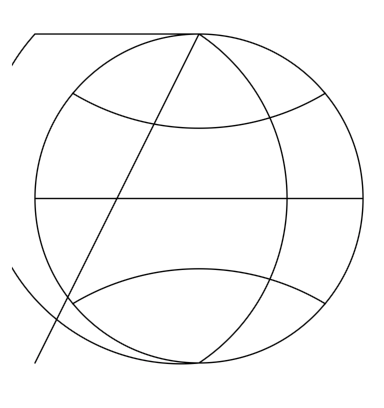
So, I was verifying that my Chemistry Keyboard works with the iOS 12 beta, and I immediately noticed that the Globe button's icon looked like this:
As I render all my artwork with my own SVGgh library, I had stumbled across a bug in Core Graphics. After much checking and simplifying I figured out that it was possible to add an arc to a CGMutablePath with parameters such that a subsequent call to CGPathCloseSubpath would not maintain the path's current point, and instead revert it to (0.0, 0.0). 

Filed a bug (42266130) with the Apple bug reporter and I hope they can get around to fixing it by release. 

[Update: Fixed in the 5th beta. Thanks for the responsiveness.]

Tuesday, April 17, 2018

Good Artists Copy, Great Artists Steal


I'd like to take this quote apart and explain its meaning to me.

The general idea is someone develops an idea, something novel and interesting, and creates something new. Someone else,  the great artist, comes along becomes familiar with the original idea, groks it, realizes how to bring it to the next level, and is able to create a product that is so much better than the original creator, that the original is a forgotten footnote. At that point, the idea has been stolen by the great artist who understood the idea better than its creator.

Example, via my brother James, at one point opera was invented and its practitioners  busied themselves taking this interesting concept and making operas of varying quality, and everybody was pretty happy with what they were doing and congratulating themselves for creating this new art form. And straight out of Amadeus, Mozart came along and revealed what came before as primitive. Mozart took the basic idea of opera and made previous attempts obsolete.  He stole opera.

Example. Smart phones existed before the iPhone. The idea is pretty obvious, and Microsoft worked at cramming Windows into a handheld device and were happy enough being the leader in a niche market. Along came Steve Jobs and his team, they thought deeply about the idea of a handheld computer and came up with a design that revealed previous attempts as clumsy, ill thought out toys. They did not try to copy Microsoft by jamming OS X into a 3.5 inch screen. Instead, they stole the smart phone.

I asked—a really quite good—programmer and colleague, "Who invented the smart phone?" He told me "Apple".

The lesson to me is we should strive as creators not to just blindly iterate on each other's work, but to look for our moment, our flash of understanding when we too can steal an idea and make it our own. I'm still looking; someday.

Sunday, October 29, 2017

Why I'd Buy a Subaru Impreza over a Civic or a Mazda 3

As I've written before, I was fixated on buying a recent Mazda 3 hatchback. Such a beautiful car, available with my favored manual transmission. Zoom zoom. However, Mazda has been promising for years to support CarPlay, and I have stopped believing them.

So, I cast about for a hatchback, with CarPlay, and a manual transmission.

Well, what about the new Civic? I've driven the same Civic for 14 years; I like Honda. However, unless you include the pricey Type R model, Honda will not sell you a Civic with both a manual transmission and CarPlay. Plus, I think the current model is angularly ugly, filled with faux touches. Nor, do I like the added mechanical complexity of a turbocharger.

My co-worker who owns a 2017 Civic, loves it, and I understand why you need an automatic for the collision avoidance features.

I spent more time in the Edmunds app looking at cars, and on YouTube watching review videos. Seems as though most people say great things about the 2017 Subaru Impreza hatchback, which in its lowest trim, the 2.0i, has both CarPlay and a manual transmission. If you go up the trims, you will end  up with a larger screen, but I'm not going to spend thousands of dollars for a bigger screen. For once, the base model has everything I really want. And while the CVT transmission might give better gas mileage and have more safety features, nobody who reviewed the car said they liked the CVT, and I have to believe it will be less mechanically reliable than a manual. Plus, this will likely be my last gasoline burning car, and I want to enjoy the anachronism.

As a big plus,  all wheel drive is a great match for driving in New England.  I am already visualizing putting a couple of kayaks on the roof rack and heading out into nature with my family.

So, early in the new year, as soon as I muster up the cash, I intend to buy a used 2017 Impreza hatchback. Maybe.

CarPlay Drops? Try Shortening Your USB Cables

I have not been a happy CarPlay user for the last couple months. I'd started getting the occasional loss of connection with my previous 3rd party receiver, and it had just gotten worse when I switched in a new one. I'd connect my iPhone 5S, it would work for a few minutes, sometimes as long as half an hour, and then CarPlay would just disappear. Replugging it in would usually work, but typically for a shorter time. I'd taken to just listening to podcasts over Bluetooth.

Things I Tried

  1. Switching from a 3rd party Lightning cable to an Apple original.
  2. Putting the phone in low power mode (maybe it was a charging problem)
  3. Just using Podcasts, avoiding Maps or Phone.
  4. Turning off Bluetooth (I drove the half hour to work once without drops when I forgot my Apple Watch)
  5. Updating to the iOS 11.1 beta.

What Worked

Replacing the 40 inch Lightning cable with a 4 inch cable. The phone might have been hanging from the USB socket, but it didn't drop over several days of commuting. 

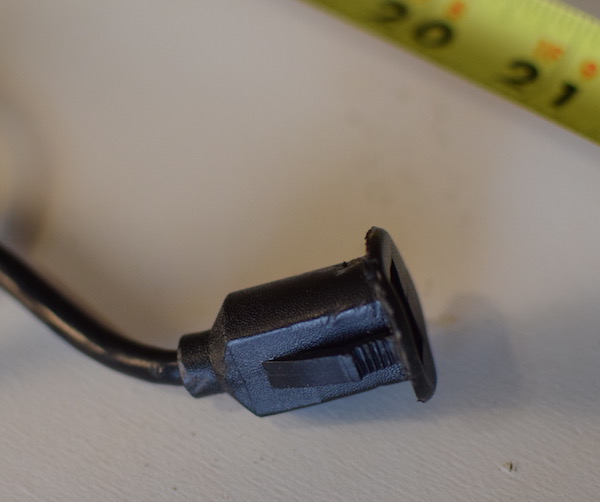
I had installed the receiver myself, and had purchased a cable with a USB-A male to flush mounted USB-A female. It looked nice, mounted on the dashboard, but 6 inches would have been as good or better than 6 feet.


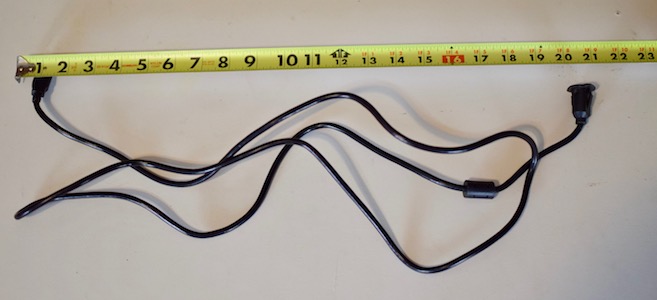
A 6 foot USB Auto Cable
All, I really wanted, the flush mounted socket
To sum up the cable run: 
  • Cable embedded in receiver: 3Ft
  • Flush mounted cable: 6ft
  • Apple Lightning cable 3.5ft
So a bit over 12 feet. A quick googling indicates that USB 2 has a maximum length of between 3 and 5 meters (10-16 feet), so 12 was starting to be a bit marginal, coupled with 3 separate cables, my oldish phone, and I could see where it might not be reliable.

Long term solution

I pulled out the overlong cable and replaced it with a 3 foot version. Fingers crossed; I've fooled myself into thinking I'd solved this a couple times before.


Thursday, October 19, 2017

Apple Has A Second Chance at the SEx (iPhone that is)

There's an old story that when Apple was getting ready to release the fast version of the Macintosh SE, their naming convention should have resulted in a Macintosh SEx, but they demurred and gave it the tamer name Macintosh SE/30.  I can remember desperately wanting one, one of the most legendarily future proof machines ever to come out of Cupertino.

And now, I'm waiting impatiently for the rumored new iPhone SE with a modern A11 Fusion chip to replace my rapidly slowing iPhone 5S. And what would you call an iPhone SE with the same processor as an iPhone X?


The Legendary SE/30 (via Wikipedia)

Sunday, July 09, 2017

Why Doesn't The Compass Work in Some iPhone Apps?

As a writer of apps—such as TV Towers USA—which rely on the device's compass, I periodically would hear from users who don't see the compass in my apps. This confused me as they would also report the built in iPhone compass app working. And the apps worked perfectly well for me.

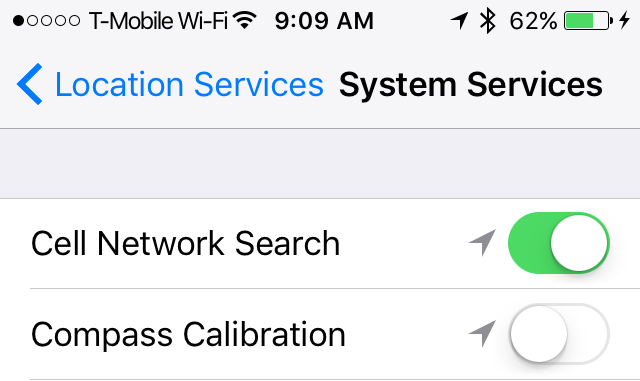
I've finally figured out what is going on. At some point, the users had turned off compass calibration in their location privacy settings. And since my apps are set to request calibrated data, the app gets no compass data at all.

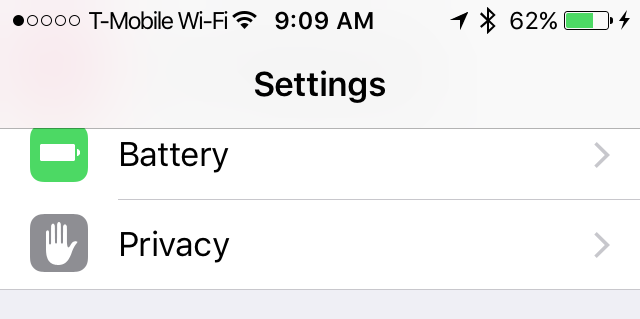
So, to fix, open the iOS Settings app.

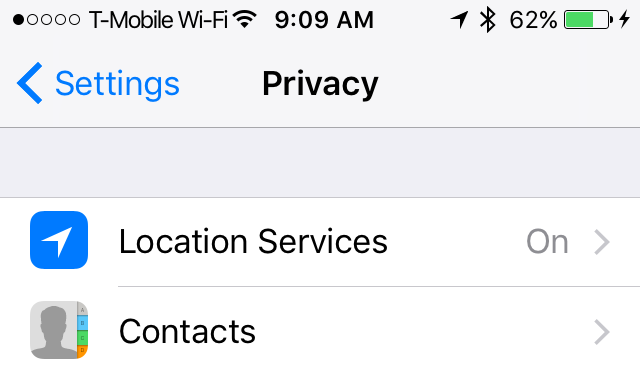
Tap the Privacy item:

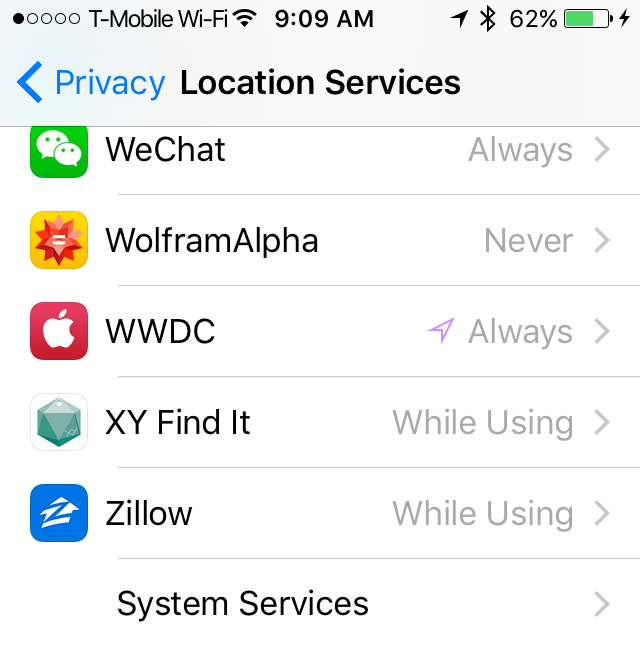
Tap the Location Services privacy item:
Tap the System Services item (way down on the bottom):

If Compass Calibration is disabled, then this was likely your problem. Enable it.

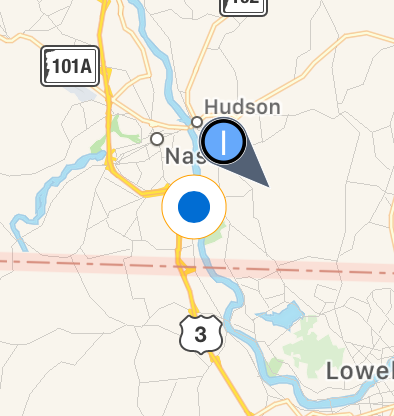
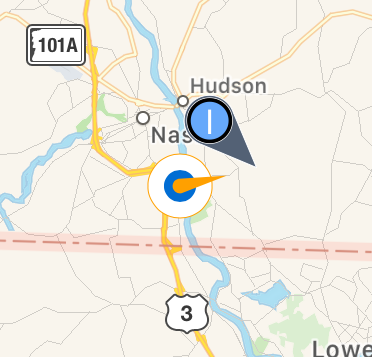
And, I hope, your app will go from not having an active compass, to having one:


I should look into detecting this condition and warning the user. Hope this helps.

Thursday, February 23, 2017

True North and the iOS Compass App

I recently got a 2 star review for my TV Towers USA app.

This would be a nice app if it pointed in the right direction!  Most of the time its sense of

direction differs from the compass app.

How can that be? ⭐⭐

Well, the short answer is that the iOS compass app tries to act like an old timey compass where North means magnetic North, and TV Towers USA instead is displaying the direction based on North being the Earth's north pole. You can go into the settings for the Compass app, turn on "True North", quit the Compass app and from then on, it will act like a super-compass that can calculate the location of the North Pole based on both magnetism and location.

I've put together a short video to describe the situation, and how to configure the iOS compass app.

Thursday, November 03, 2016

Why an Ad Supported Model Isn't For Me

As always, I was grateful to get a 5 star review for Signal GH, my app to let HDHomerun users best point their antennas. 


⭐️⭐️⭐️⭐️⭐️ Very useful. - Does exactly as described. Very useful if you are aiming an outdoor antenna, especially on a roof or similar. Gives data that is all in one place and not easily found with other software. Kinda stings to buy an app that you only really need once or twice. Would be ok with ads built in to make it free as nobody needs an app like this very frequently.

I think this idea deserves a response.

I don't like apps with ads in them. As a consumer of apps, I don't download ad supported apps. I don't like the contortions ad support brings to an apps layout, and the lengths it drives developers to get more views.  So, I'm not inclined to use ads just on principle.

And even if I were so inclined. A little research indicates that a good ad rate would be $4 per 1000 ad views, or .4 pennies per view. Let's say that I could prolong the antenna pointing session long enough to squeeze 10 views out of my users, that would be 4¢ per user. Maybe, if I did a poor job in the first session, I could rake them back in for a second, so 8¢. I make $2.10 from a sale of Signal GH, and with that I'm far away from quit my day job territory, or even pay for my computer hardware territory. Nor is there a universe out there with 40 users for the app that will download a free version for every 1 that would pay for it, and if there were, how would I be able to respond to any tech support they needed?

Meanwhile my users have paid $100 for a decent antenna, $90-200 for an HDHomerun, plus cables, a pre-amp, connectors, paddle bits, drills, masts, grounding wires, and a TV. All of these cost more than the $2.99 they pay Apple for my app, and ending with a set up that will deliver free (ad supported) content for years.

So, no, I will not be moving to an ad supported model.

Sunday, October 02, 2016

On Typing Everything In - My Updated Web Site

I have a quirk of typing what most people wouldn't think type-able.

My wife was once going to be the stateside representative of a Beijing University department, and needed a business card. And as I wanted it to be a perfect business card, I typed the entire thing as EPS as in:

%!PS-Adobe-2.0 EPSF-1.2
%%Title: peking university logo.eps
%%CreationDate: 4/8/08 1:30 PM
%%BoundingBox: 0 0 50 50
/outsidecircletext
{ circtextdict begin
/radius exch def
/centerangle exch def
/ptsize exch def
/str exch def
/xradius radius ptsize 4 div add def
gsave
centerangle str findhalfangle add rotate
str
{ /charcode exch def
( ) dup 0 charcode put outsideplacechar
} forall
grestore
end
} def
/insidecircletext
{ circtextdict begin
/radius exch def /centerangle exch def
/ptsize exch def /str exch def
/xradius radius ptsize 3 div sub def
gsave
centerangle str findhalfangle sub rotate
str
{ /charcode exch def
( ) dup 0 charcode put insideplacechar
} forall
grestore
end
} def
......
This was back when Postscript was fresh in my mind after rebuilding ChemDraw's Postscript sink, nowadays this looks about as confusing to me as it does to most of you. I will admit that doing text along a path in Postscript is not as easy as it sounds. 

And, of course, I write all the graphics for my iOS apps in raw SVG. This has been great for responsive design and reusability. as in this location dot/compass from my broadcast towers apps. 
It seems to me that a good way to learn something, whether it be Postscript, Swift, SVG or any other computer language, you have to roll up your writing sleeves and start typing. Thus, my goal the last month has been to learn CSS. As anybody looking at my sloppy Blogspot blog here can see, I have not been an expert in either HTML or CSS, and I have hopes of changing that. 

So, I took my old iWeb website (yes, I was still using iWeb) and wrote a new one from scratch in pure HTML/CSS. No Javascript, no Typescript, no frameworks or templates. The new GenHelp.com meets my simple needs and is pretty nice, I  think, for somebody with so little experience with modern web page development. It's mobile first, responsive, and makes good use of many of the SVGs I use in my native apps. For instance, all the app pages, use the actual SVG I use to generate the PNGs for the app icons. 

It'd be nice if Safari supported my favorite SVG property: vector-effect="non-scaling-stroke" but other than that, the graphics just work and make for some very light pages, and graphics that scale as the size of the page changes. If you are on a desktop browser, go and see how the icons on my home page scale smoothly with the size of the page. Extra responsive and extra gratifying. 

Maybe now, I can get to work on my Swift CSS parsing project. 

Wednesday, September 14, 2016

When The Simulator Doesn't Act Like a Device

I had to pull Signal GH from the App Store two days ago because mach_absolute_time which is based on CPU clock cycles returns quite different values on my Mac Mini than it does on an iPhone 5S, and a quick hack I had done to fix the build for Xcode 8 resulted in a severely degraded user experience.

Well, thanks to the magic of Expedited Review, it's back in the Store. Thanks Apple and my apologies to any customers that had a bad experience.

Thursday, August 25, 2016

Apple Doesn't Make a Mac I Would Eagerly Buy

I've been using Macs pretty much exclusively since I walked into the computer lab at International Falls Senior High and saw one in 1984. I've never not owned one since I bought a Mac Plus at the University of North Dakota bookstore in 1989.  I'm happy with the 2012 Mac Mini I'm writing this with.

And there is not a Mac that Apple sells that isn't so compromised that I would consider it worth its asking price.

The MacBook

Great looking computer, would buy them for my kids or to take on trips, but a single USB-C connector and a 1.2GHz Intel Core m5 do not make for a general purpose computer. At some point, somebody is going to have come with a single cable replacement to Thunderbolt that will drive a 5K monitor. Until then, I'd feel like I was buying a disposable machine. 

MacBook Pro 13-inch

Yes, Apple is still selling the same MacBook they sold me in 2011, more or less. It did manage to pick up USB 3.0 ports. Can put an extra hard drive in it. But 802.11n WiFi? 1280×800 screen? I already have this excellent but out of date machine. 

MacBook Pro Retina

I use one for work, and it is a great machine. Plenty of ports. Beautiful display. Great trackpad. Adequate keyboard. MagSafe connector.  Solid as a rock. I guess I could see getting the 13" model. But to be my main machine it would need a lot more that 1TB of storage and unlike my 2011 MacBook Pro, there's no place to put an extra drive in it. Plus, why is the 15" $700  more than the 13"?

MacBook Air

Who, at this point, is going to buy a MacBook Air, with its ridiculously out of date screen?

iMac

The 5K Retina iMac is actually quite a nice looking computer, but I just cannot get around the idea of permanently tying a desktop Mac to such an expensive monitor. Also, a desktop Mac with pretty much zero internal expandability. I used to own a PowerMac 7600, now that was an expandability monster. Maybe if it were cheaper. 

Mac Pro

I could buy one if I needed the performance level, but I'd feel foolish given how it hasn't been refreshed in 3 years and still has an entry level price of $3000.

Mac Mini

The current Mac Mini is a compromised product crippled—I would guess—to keep it from taking sales from higher margin machines. I feel bad for the engineers tasked with taking the epically nice 2012 design and removing all traces of internal expandability or quad-core processors. I feel bad for Phil Schiller for having to introduce it. I feel bad for anybody who paid full price for it. I feel bad.

The Buying Trigger

I'm happy with my Mac Mini. In order for me to get out my credit card, a Mac would have to do something my current one can't. So, if there was such a thing as an affordable quad core 13" Retina laptop, with 2TB of storage, and it had a single connector that would drive a 5K display, that would be something I would buy on the first day of availability. Until then, I'd only buy a new Mac if an old one broke. 


[Update: after 2 years, I bought that 2015 MacBook Pro with Retina 13", used with only 512GB of storage. Obviously not as a primary machine, but for coding on the go, it was cheap enough and good enough.]

Sunday, August 21, 2016

The Awesome Responsiveness of Swift.org

I encounter a bug in Swift 3

I had this cool idea to enhance CGPath, create an extension which would add a convenience init method that would take an SVG formatted path string. How neat would it be to be able to write
  let frogPath = CGPath(svgPath: "M 170 207C139 183 40 199 41 109A18 18 0 1 1 56 75Q67 53 91 45A18 18 0 1 1 127 40C170 29 193 62 212 173L225 110Q241 70 252 120L253 156 C253 180 265 223 235 214Q210 210 215 242 C222 265 161 249 125 248") 
and have a complicated curve available for display. (I should say this all relies on other code in my brand new, and very incomplete Scalar2D project)

So, I opened up a new source code file and tried:

public extension CGPath 
{
 public convenience init?(svgPath: String)
 {
  guard let mutableSelf = CGPath.pathFromSVGPath(svgPath) else
   {
   return nil
   }
   return mutableSelf.copy()
  }
}

Now the compiler didn't like this and told me I couldn't assign to self, and I couldn't figure out how to do what I wanted, so I turned to CGMutablePath, which I could mutate in the init method. I therefore tried


public extension CGMutablePath
{
 public convenience init?(svgPath: String)
 {
  self.init()
   if !self.addSVGPath(svgPath)
   {
   return nil
  }
 }
}
And the compiler promptly crashed. I had found a bug in the pre-release Swift 3 compiler.

I report the crash

In the olden days before Swift had been open sourced, if I could find the energy, I would find my way to the Apple Bug Reporter and enter my bug, never knowing if I was the first or the millionth person to encounter my problem. And it would sort of disappear, unless a request would come back sometime later for more information, or it was marked as a duplicate, or whatever vaguely unsatisfying outcomes would manifest.

For example, a bug I reported against Safari 8.0.6 in June of 2015, 21364634 Safari not Rendering SVG Gradients Properly, that has not been commented upon, nor fixed. But at least that is still open, most of my reported bugs have been archived, several with the rather insulting description of Insufficient Information, no they have plenty of information, with steps to reproduce and in one case even an Xcode project I took the trouble to generate. Others were tersely marked as duplicates, and one was operator error on my part when using MKPolygonRenderer.

But, this is the new era of open source Swift so, I made my way to bugs.swift.org  and discovered not some custom tool, but honest to goodness JIRA, the same tool I've used in many projects over the last several years. Wow, this was new. I could browse through the bugs and see if what I was seeing was already reported. Didn't seem to be. So, I opened up a new issue, simplified my steps to recreate to something you could type into the command line REPL and created my issue: SR-2338 Compiler Crash on Implementing Optional convenience init of CGMutablePath

The Awesomeness of Responsiveness

Within hours, someone with an Apple email address replicated the bug, and commented upon it in the JIRA issue for all to see. And a back and forth ensued amongst team members about what to do, where the bug came from, and possible solutions. My particular bug came from an initiative to give Core Graphics a more Swift-like object interface instead of the traditional C style interface. Nobody had considered the idea of testing if adding a convenience init method would work. Code and test cases were generated and a pull request was offered where anybody could comment on the pull request. When the resulting code wasn't right, an other approach was taken wherein the compiler just wouldn't allow you to extend Core Graphics objects this way, and a better fix would be delayed.

All of this was done in full view of the world, where anybody with an interest could contribute. And the final release of Swift 3, will be more reliable for it.

Saturday, May 21, 2016

Where are All the New CarPlay Receivers?

Back in late February, I was a bit miffed to hear that the JBL Legend CP100 CarPlay receiver was going to be released while I was visiting relatives in China;  I'd have to order one when I got back. But by the time I got back, it had been delayed until late May. So, I pre-ordered one on Crutchfield and went about wishing for time to pass. Then it was delayed till early July according to the JBL website. Then it was delayed till early August.  I became concerned for my own mortality over wishing for so much time to pass. (Could be worse, I could be waiting for Amazon to start showing Grand Tour episodes, oh wait I am. Curse you time for being both slow and fast in the wrong ways.)

I have now started looking for a different receiver. But few of the 2016 CarPlay receivers announced in January have seen the light of day. Crutchfield has a note like the following on several pre-orderable CarPlay receivers:
Crutchfield first offered this item for pre-order in January of 2016 and we regret that we are still awaiting our first shipment. There have been delays getting the necessary certification from Apple for the CarPlay feature. As soon as we have firm shipping information, we will post an official Estimated Time of Arrival (ETA) for this radio. Thank you for your patience and understanding.
The JVC Arsenal KW-V820BT, and a bunch of Kenwoods are also awaiting pre-order. [Update: in early July, the KW-V820BT shipped].

That leaves Pioneers: the AVIC-8200NEX and its siblings (7200, 6200, 5200), which are all navigation/DVD playing receivers, and the AVH-4200NEX which is a DVD receiver. Since this is slated for the front of my Civic and Apple invented a thing called the iPad, I don't have much use for DVD playback. I have a hard time imagining the use case where I'm stopped, with my parking brake engaged, watching DVDs. My kids tend to watch YouTube videos in the back seat over the cell network while I drive.  CDs? What is this 1999? As for navigation, I like the constantly updated Apple maps, so the advantage of a navigation receiver is for when I'm out of range of a T-Mobile tower. This does happen when I take the kids up into the White Mountains north of where I live in New Hampshire. Also, apparently, the external GPS antenna can supplement the GPS in my phone, making location services more accurate while driving.  At the moment, Amazon has the AVIC-5200NEX for $575, and the AVH-4200NEX for $520. The 4200 has more media options: HD Radio, an SD reader, HDMI input, and more important for a lot of people: Android Auto support. To get everything in one package, you have to move all the way up to the AVIC-7200NEX, which Amazon sells for $822.  I tend to think the only feature I'd ever use is the external GPS antenna, and possibly the maps which might be worth the $55 premium.

It seems like every receiver has 1.0A USB charging. It'd be nice if it had 2A charging for an iPad or to fast charge an iPhone 6 Plus.

I'm not looking at older CarPlay receivers because I'm hopeful the newer models will be zippier and have the earlier generation kinks fixed. The reason I waited so long on the JBL was because their demonstration videos showed it to be quite fast and allow for pinch to zoom on maps instead of pressing zoom in-zoom out buttons.  So, I'm ignoring older models like the Alpine iLX-007 or the Pioneer AppRadio series.

There is the whole resistive versus capacitive screen debate, and given my druthers, I'd prefer capacitive for its responsiveness, but I don't want to pay a premium for it. And I'd prefer a big volume knob and an easy to hit Siri button, but that doesn't appear to be a choice. Therefore, if I were to buy a receiver today based on specs, price, and availability, I'd buy the AVIC-5200NEX. But I'd be really unhappy about paying about $120 extra for a DVD player I literally will never use after reviewing it. 

I wonder why Apple is delaying so many of the other receivers, they don't seem to have appreciably different specs from the Pioneers they approved. It has the same USB amperage and screen resolutions. In the hopes that something they announce at WWDC in a few weeks will make this make sense, I'm going to hold off ordering the AVIC, but it is weird.

[Update: Crutchfield support tells me:
That receiver has become more delayed than we anticipated. You will probably getting a letter from us soon. The receiver now may not be here until January of next year.
]

[Update 2: I bought my wife a Sony XAV-AX100 and have been very happy with it. It's much nicer than the JVC KW-820BT I purchased for my Civic.]